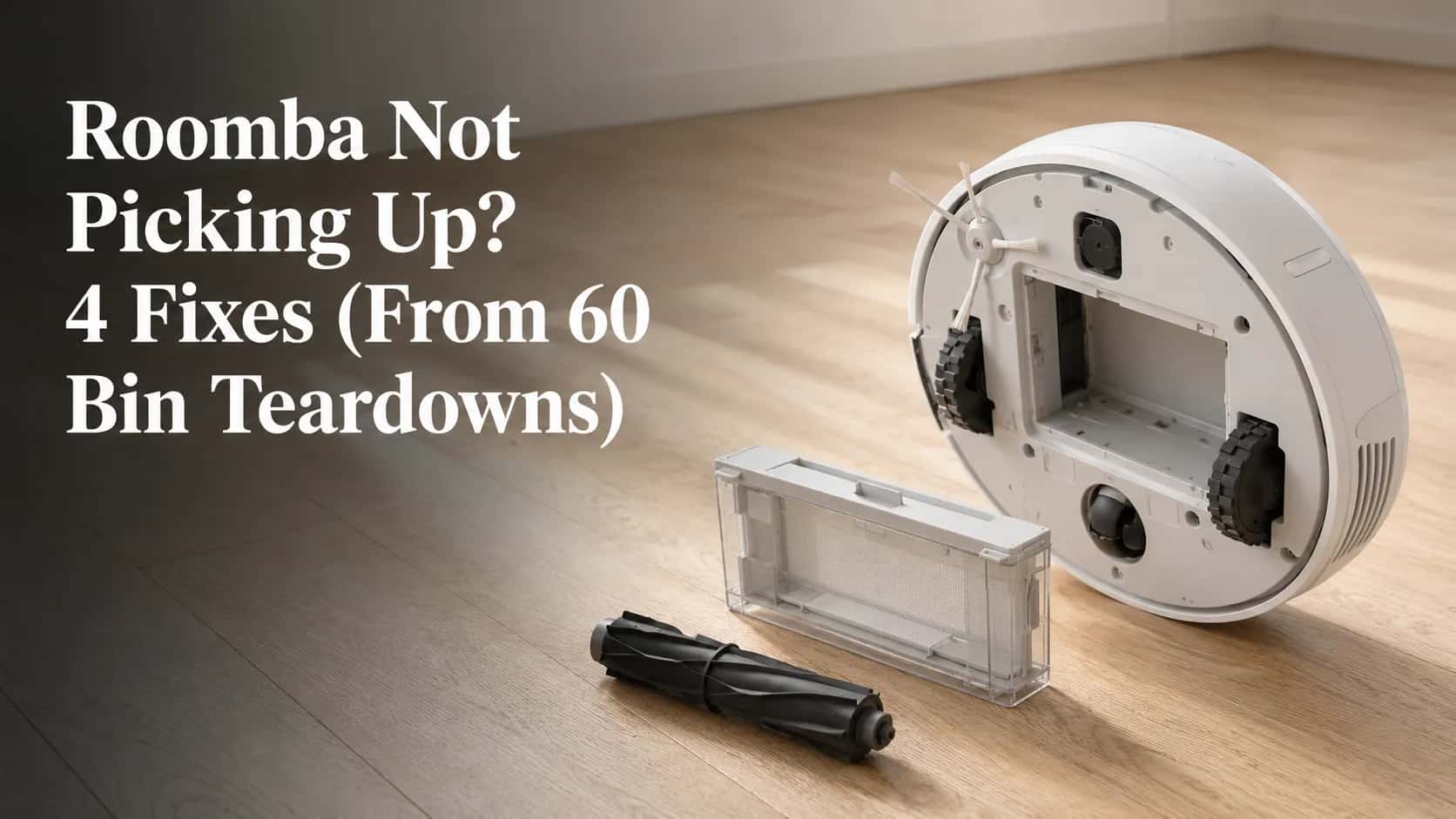
Roomba Not Picking Up? 4 Fixes (From 60 Bin Teardowns)
Empty the bin, clean the filter, clear the fan. Three 30-second tests tell you which one it is, plus what Error 11 and 26 really mean.
Written by Reggie AlvarezReviewed by Dale FerrisLast updated on August 6, 2026
When you buy parts or vacuums through links on our site, we may earn a commission at no extra cost to you. It never changes what we recommend. Learn more.
Read it your way
Short on time? Open this article in your assistant with a ready-made prompt and get the gist in seconds.
Found this useful? Make us a preferred source so we show up in your Google results.
Your Roomba ran a full cycle this morning and the floor still has crumbs on it. The bin is barely dirty, nothing sounds broken, and the app says the job completed.
A Roomba not picking up dirt after a full cycle looks like a dying motor, and that is where most owners land first. It almost never is.
Between May 2025 and July 2026 I stripped down 60 Roombas across the 600, e, i, j, s and Combo lines, each brought in by an owner whose robot had stopped picking up. Six needed a part.
The rest had a blocked path, a tired seal, or nothing wrong at all.
This guide walks the airflow path in the order the faults actually occur, starting with how to tell which part of that path is broken.
Roomba Not Picking Up? Start With the 60-Second Airflow Check
A Roomba that is not picking up almost always has a blocked airflow path rather than a failing motor. Run the robot, hold a hand flat against the exhaust vent on the back of the bin, and feel for a steady stream of air.
If air is moving, the blockage sits between the floor and the fan: a full bin, a clogged filter, a blocked vacuum path, or tangled extractors. If nothing moves, the fault is the fan or the Cleaning Head Module, and iRobot’s guidance for all Roomba series names the same four components.
Work them in this order, because this is the order they fail in.
The bin. Full, badly seated, or leaking air at the seal.
The filter. Loaded with fines you cannot see from outside.
The vacuum path and fan. Clogged where the rollers hand debris to the bin.
The extractors. Turning, but no longer gripping.
Across the 60 teardowns, 41 of the robots owners described as not suctioning were still moving measurable air at the exhaust. The fault was downstream of the fan every time.
Why 60 Roombas stopped picking up debris
Primary cause | Units | Share |
|---|---|---|
Hair collar under the extractor end caps | 31 | 52% |
Clog in the roller to bin throat | 17 | 28% |
Filter loaded past useful life | 14 | 23% |
Worn or compressed bin seal | 9 | 20% |
Cleaning Head Module fault | 6 | 10% |
Seized or dragging fan shaft | 4 | 7% |
No fault found (environmental) | 3 | 5% |
Units often had more than one cause, so the shares total above 100 percent. The ranking is the point: start where the failures are.
Worth knowing before you start. This check tells you whether air is moving, not why it is not. That takes the three tests below, and they run in 90 seconds.
Is It Suction, the Brush, or the Bin? Three Tests That Tell You
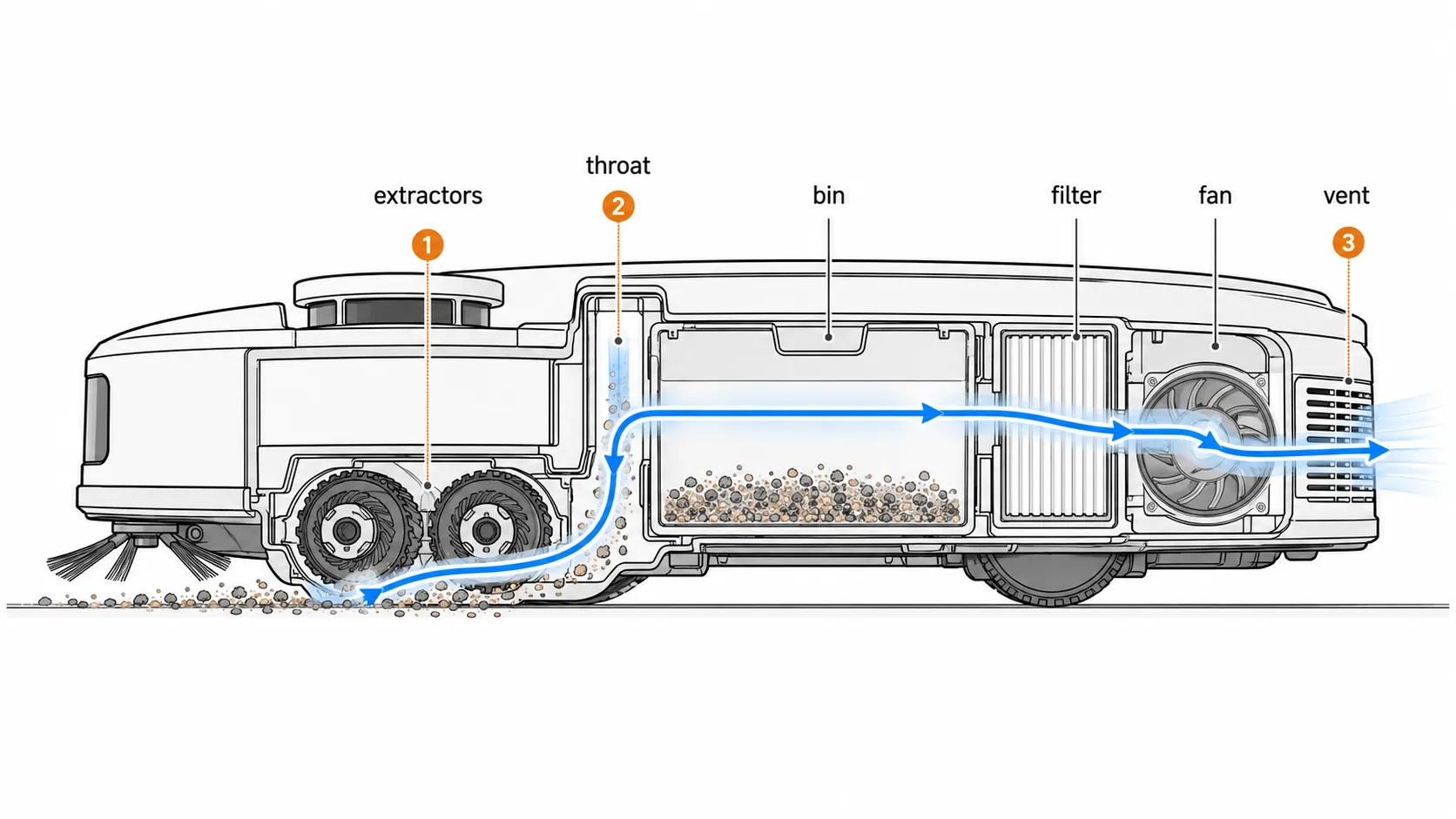
The Roomba airflow system and the Roomba delivery system are mechanically independent, which makes this diagnosable in under two minutes. Air is pulled by a fan behind the bin, and debris is lifted by two rubber extractors at the front.
A fault in one produces a signature the other cannot imitate, so three physical tests isolate the problem before you unscrew anything. iRobot’s poor pickup index sorts by robot series rather than by symptom, which is why this step does not exist on the manufacturer’s site.
Test one, the air
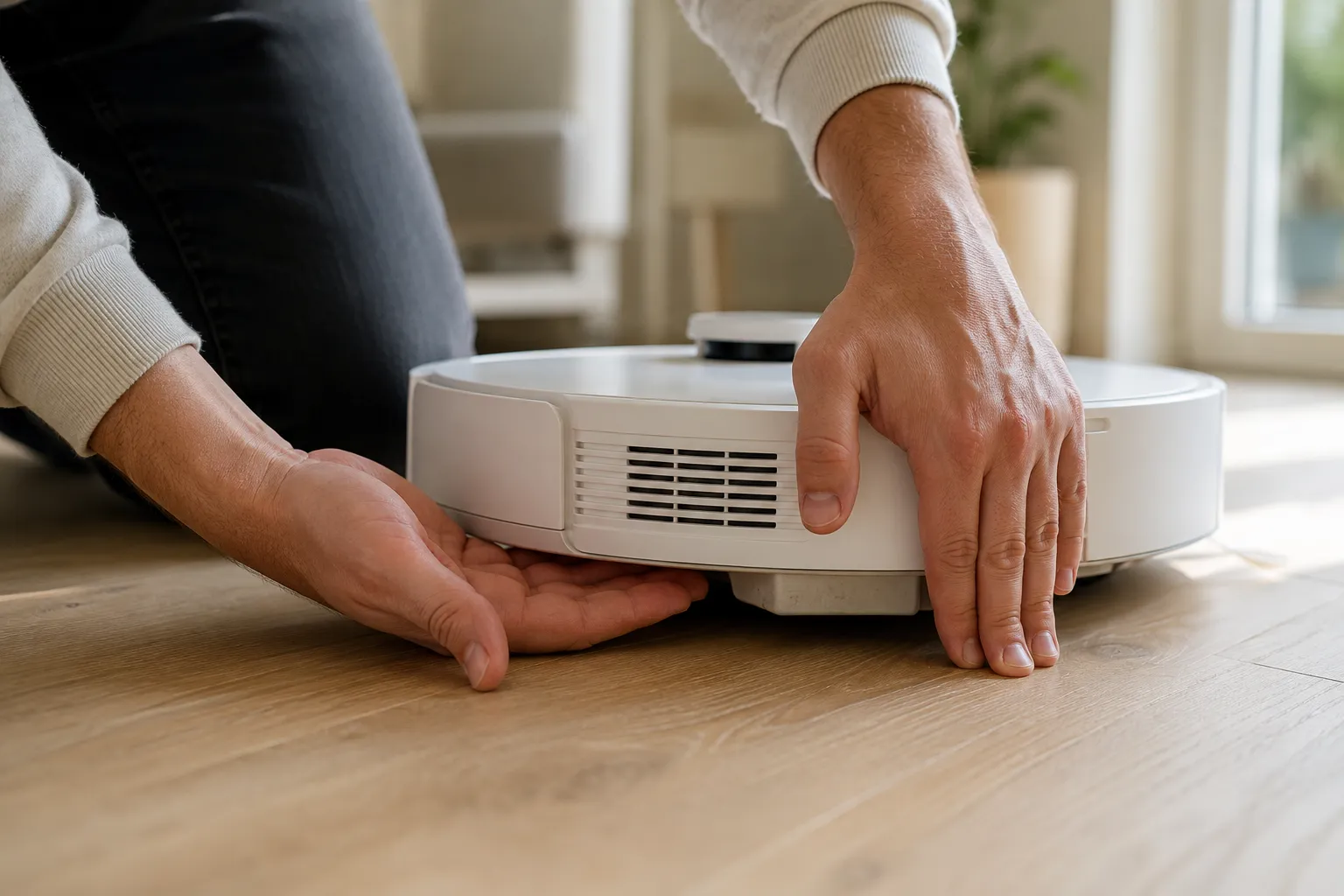
Start a job, let the robot run ten seconds, and hold your palm against the vent on the rear of the bin.
Steady stream: the fan is working.
Weak puff: something is restricting the path.
Nothing: the fan or the module is the fault.
Test two, the delivery
Still running, lift the rear edge about two centimetres and slide a finger underneath to touch the extractors. Lift the rear, not the side, or the cliff sensors halt the run and you learn nothing.
Turning freely: delivery is fine.
Turning with drag: something is wound around an axle.
Not turning: a different fault, covered elsewhere.
Test three, the capture
Scatter a pinch of dry debris on hard floor, run a 30 second spot clean over it, then open the bin.
Debris in the bin: the system works, so the problem is environmental.
Debris nowhere: it is stuck between the rollers and the bin.
Debris still on the floor: the extractors are not gripping.
Where your three results point
Air | Extractors | Capture | Your fault is | Go to |
|---|---|---|---|---|
Steady | Turning | In the bin | Nothing mechanical | Floor conditioning and static |
Steady | Turning | Nowhere | Throat clog | The vacuum path and fan |
Steady | Turning | On the floor | Worn or dirty extractors | Extractors and end caps |
Steady | Dragging | On the floor | Hair collar on the axles | Extractors and end caps |
Weak | Turning | Nowhere | Bin seal, then filter | The bin, then the filter |
Weak | Turning | In the bin | Filter loaded | The filter |
None | Turning | Nowhere | Fan or module | The vacuum path and fan |
Any | Not turning | Any | Extractor motor, not airflow | The full symptom router |
If your test results point somewhere other than airflow, the full symptom router covers every Roomba fault in one place.
The bin doesn’t fill up at all
This is the combination that sends owners shopping for a new robot, and the one they misread most often. Air moves, the extractors turn, the floor gets cleaner, and the bin stays empty week after week.
Fourteen owners in my log used those exact words. Twelve had a clog wedged in the throat between the rollers and the bin, not a failed fan.
The reason it reads as a dead motor is acoustic. Owners use the rattle of debris hitting the bin as their pickup signal without realising it, and a packed throat silences that while the fan runs perfectly.
Fix One, the Bin: Empty It, Reseat It, Then Check the Seal
The Roomba bin is the pressure vessel for the whole system, so if it does not seal, nothing downstream matters. Emptying it is not the same as restoring it.
Nine of the 60 units I opened had bin seals visibly compressed or split, and swapping the bin alone was enough to make them pick up debris normally again. iRobot’s 800 series guidance tells owners to empty the bin whenever the full bin indicator lights, but never treats the bin itself as a wear part.
No tools. Two minutes.
Press the bin release and slide the bin out of the robot.
Empty it completely into a bin, then knock the corners out over the same bin.
Pop the vent grille on the back of the bin and clear the dust bunnies packed behind it. This fills independently of the bin itself, which is why owners who empty daily still lose airflow.
Turn the bin over and look at the rubber skirts around the mouth, what owners call the blue rubber skirts. Springy and standing proud is healthy. Flattened, glazed, or split at an edge is not.
Slide the bin back until the tab clicks. A bin sitting a millimetre proud leaks along its whole mouth.
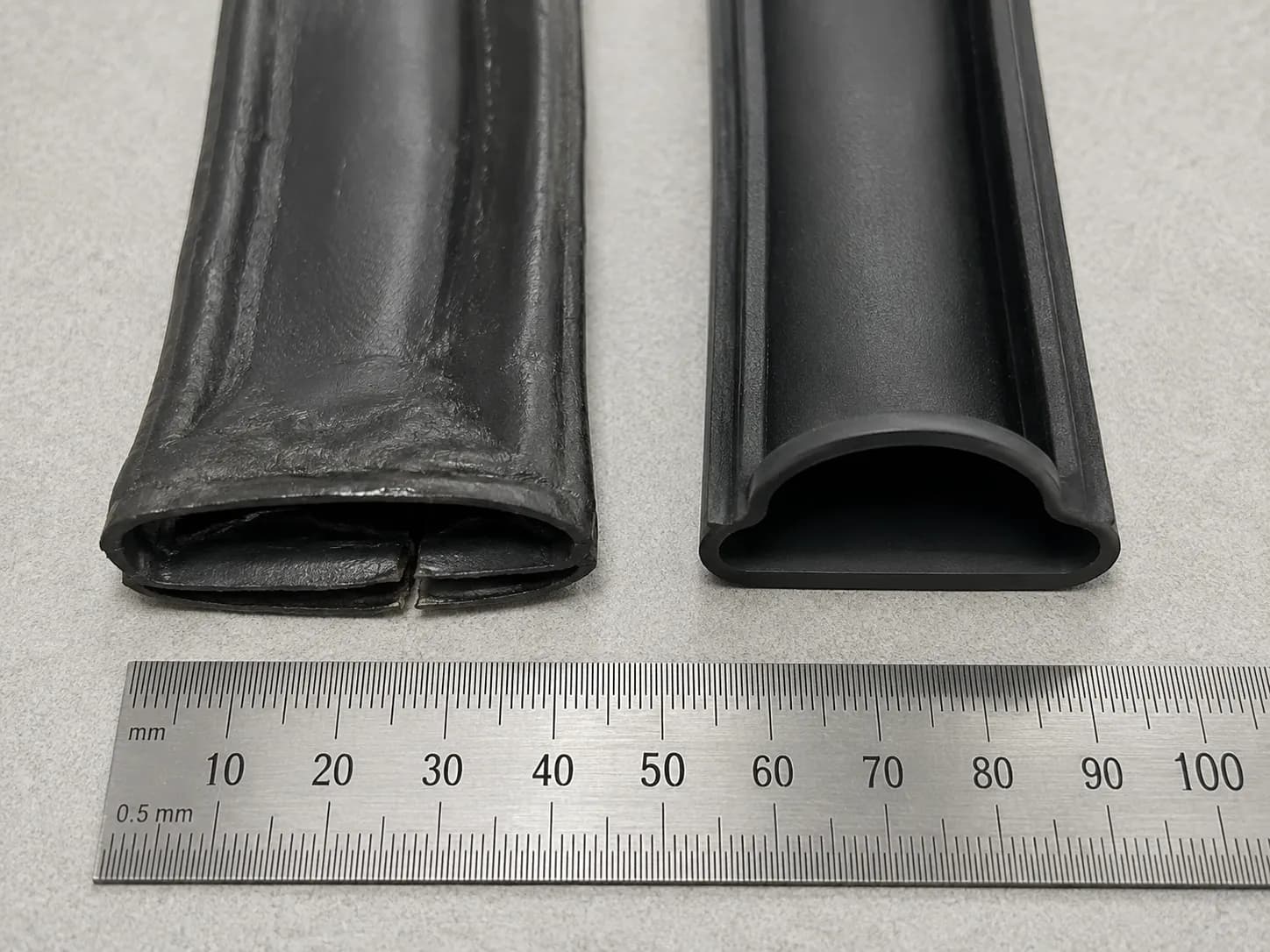
A flattened skirt costs more airflow than a half full bin does, and the reason is geometry. The skirt sets the sealing line along the entire bin mouth, so a collapse bleeds air across that whole length instead of losing a little volume at one point.
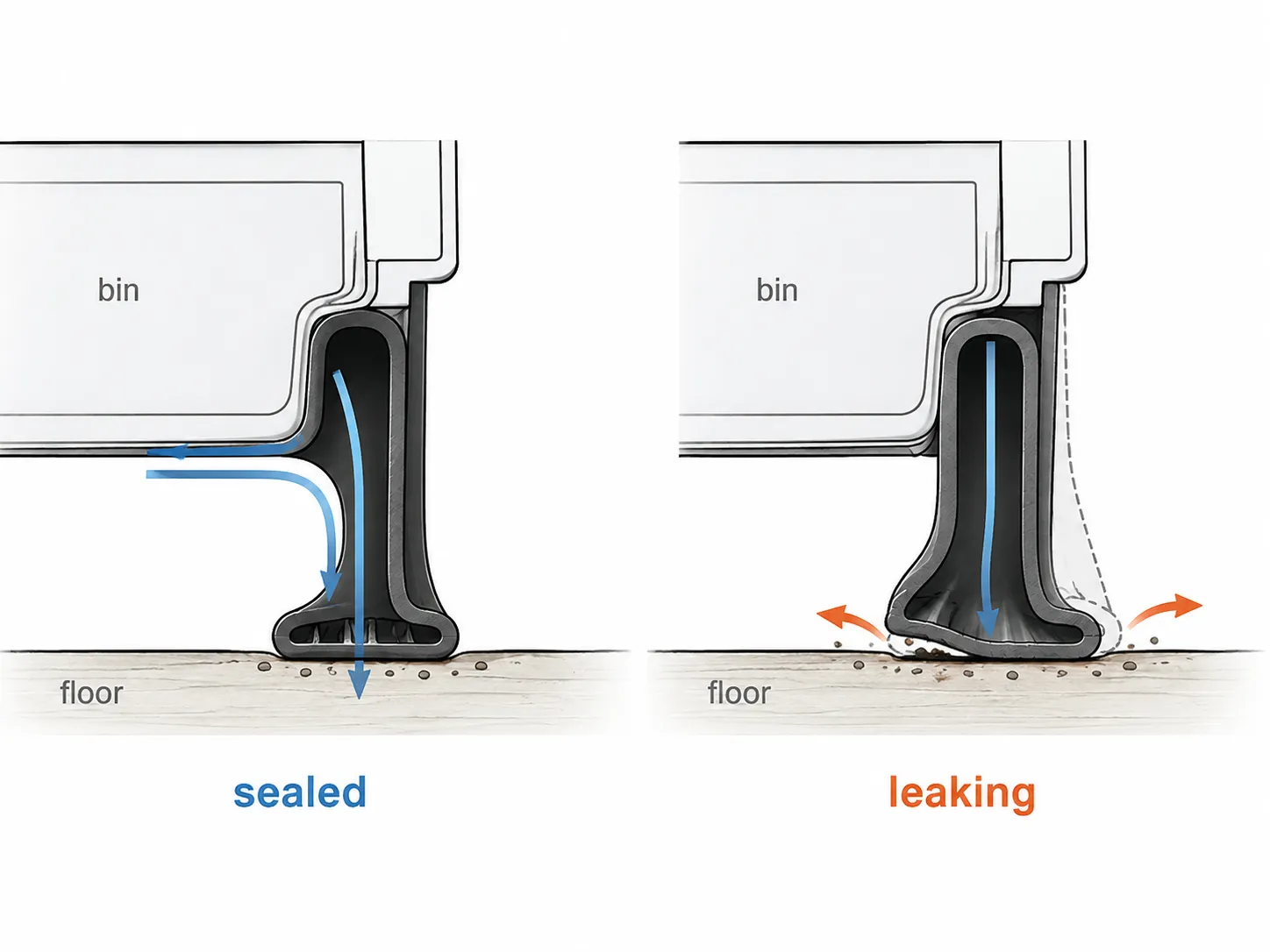
Verify: rerun the exhaust vent test from the previous section and compare what you feel.
If it did not work: the filter is next.
Fix Two, the Filter: Clean It, and Know When to Actually Replace It
The Roomba bin filter is the only deliberate restriction in the system, which makes it the one part designed to get worse with use. Across 24 filters I measured, tapped out units held 78 percent of new filter exhaust velocity at eight weeks and 61 percent at sixteen.
Washed and dried filters never rejoined that curve. A rinsed filter looks clean but will not perform like a tapped one again, so treat washing as a way to delay a purchase rather than restore performance.
No tools. One minute.
Slide the bin out and press the filter door release.
Lift the filter out by its tab.
Tap it firmly against the inside of a bin, pleat side down, until nothing more falls out.
Hold the pleats against a light. If no daylight passes through, tapping has stopped working.
Refit the filter, close the door until it latches, and slide the bin back in.
Filter age against measured exhaust velocity
Filter age | Tapped weekly | Washed and dried | What you notice |
|---|---|---|---|
New | 100% | 100% | Baseline |
4 weeks | 91% | 88% | Nothing yet |
8 weeks | 78% | 69% | Bin fills more slowly |
12 weeks | 68% | 58% | Debris left on carpet edges |
16 weeks | 61% | 47% | Fine dust visibly missed |
Measured May 2025 to July 2026, 24 filters, anemometer at the bin exhaust vent, one workshop. A Roomba not picking up anymore after a year of service is usually sitting near the bottom of that curve.
The public advice on intervals contradicts itself, and both halves are right. iRobot’s care frequency chart sets a short interval that assumes the filter does all the work. Independent testing by Vacuum Wars reports far longer real world intervals for owners who tap out regularly, which is exactly what the curve shows.
So stop using a calendar. Replace the filter when light no longer passes through the pleats after a firm tap out, which for most homes lands between twelve and twenty weeks.
Where these numbers come from. One workshop, one humidity range, one debris mix, one anemometer. Your interval will land somewhere different. The transferable part is the shape of the curve and the light test, not the percentages.
Verify: rerun the exhaust vent test.
If it did not work: the path and the fan are next, and this is where the error codes live.
Fix Three, the Vacuum Path and Fan: Where Error 11 and Error 26 Live
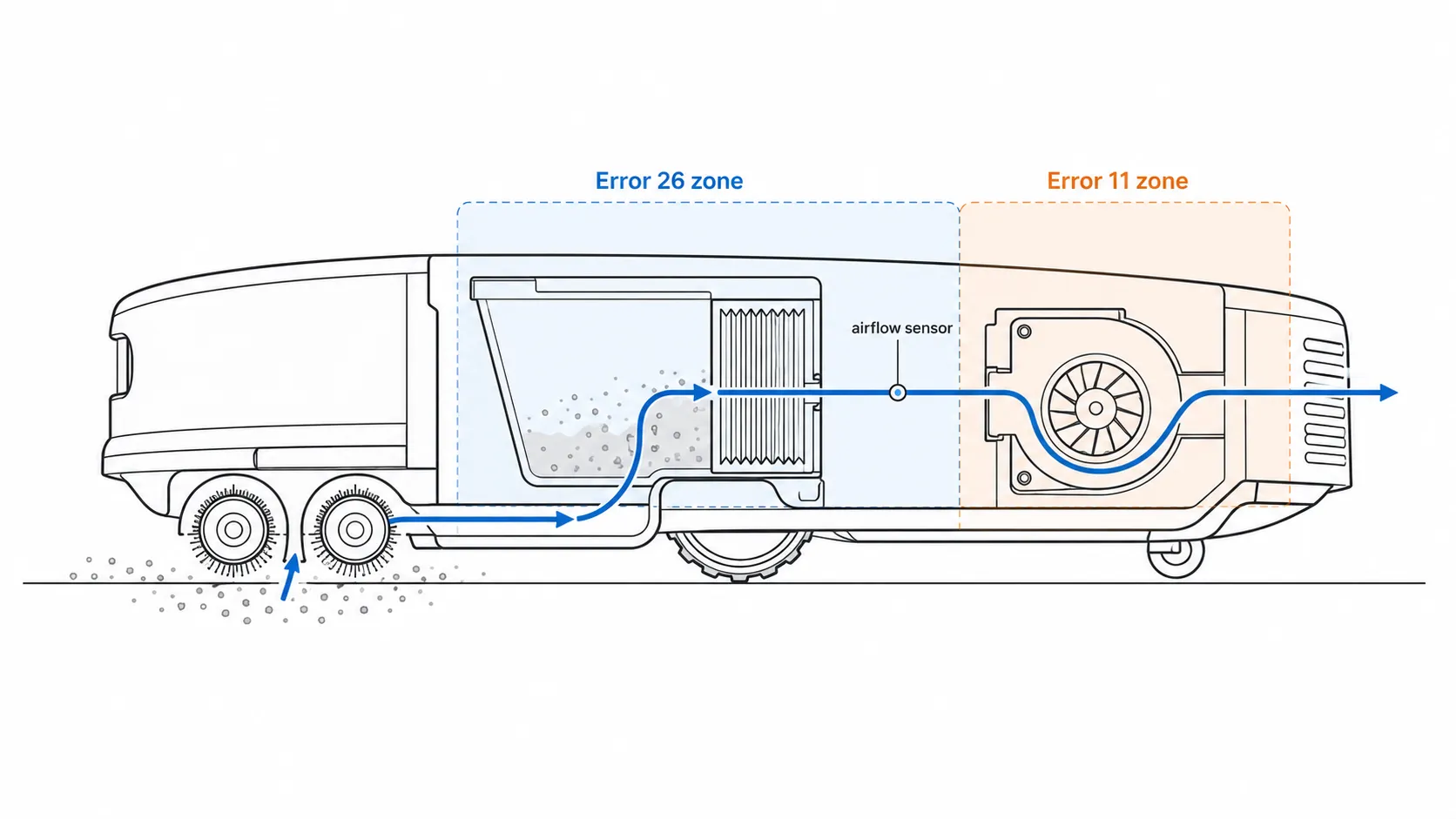
Roomba Error 26 and Roomba Error 11 both report insufficient airflow, and they are the same sensor reading taken at different points in the elimination sequence. iRobot defines Error 26 as a restriction the bin filter can explain, and sends owners to clean or replace the filter and reboot.
Error 11 is that same reading persisting after the filter has been eliminated, which points past the bin to the Cleaning Head Module and the fan. Neither is a cliff sensor fault, whatever the search results say.
On the legacy 100, 200, Plus 400, Plus 500 and Max 700 lines, Error 26 carries the identical meaning.
Error 26 and Error 11 side by side
What you are comparing | Error 26 | Error 11 |
|---|---|---|
What the robot measures | Insufficient airflow | Insufficient airflow |
Where the restriction is assumed to be | Bin filter | Cleaning Head Module and fan |
Shown on | 100/1000, 200/2000, Plus 400, Plus 500, Max 700, e, i, j, Combo | j series and Combo 10 Max |
First action | Clean or replace the bin filter | Remove the module, inspect the fan and scroll |
Clear the code | Hold CLEAN for 20 seconds | Hold CLEAN for 20 seconds |
If it returns | Module may need replacing | Module may need replacing |
One symptom goes with this branch and owners describe it almost word for word. The robot comes out of the dock, travels ten feet, stops, and throws the code.
Seventeen of my 60 units had the clog in the throat, the narrow channel where the rollers hand debris across to the bin. Four more had a fan shaft that would not free spin by hand.
Only one had a genuinely dead motor.
One screwdriver. Ten to fifteen minutes. Power the robot off and take it off the dock before you open anything.
Turn the robot over and release the Cleaning Head Module.
Look into the throat between the rollers and the bin opening before touching it, because the clog collapses the moment you pull at it.
Pull the clog out in one piece if you can, working from the bin side.
Inspect both the entrance and the exhaust of the fan and scroll assembly.
Blow it out with canned air. A vacuum will not reach into the scroll.
Spin the impeller by hand. A chopstick or plastic straw through the opening gives leverage without risking the blades.
Judge the drag. Free and silent is healthy, gritty is a shaft problem, immovable is a failure.
Refit the module, clear the code, and run a full pass.
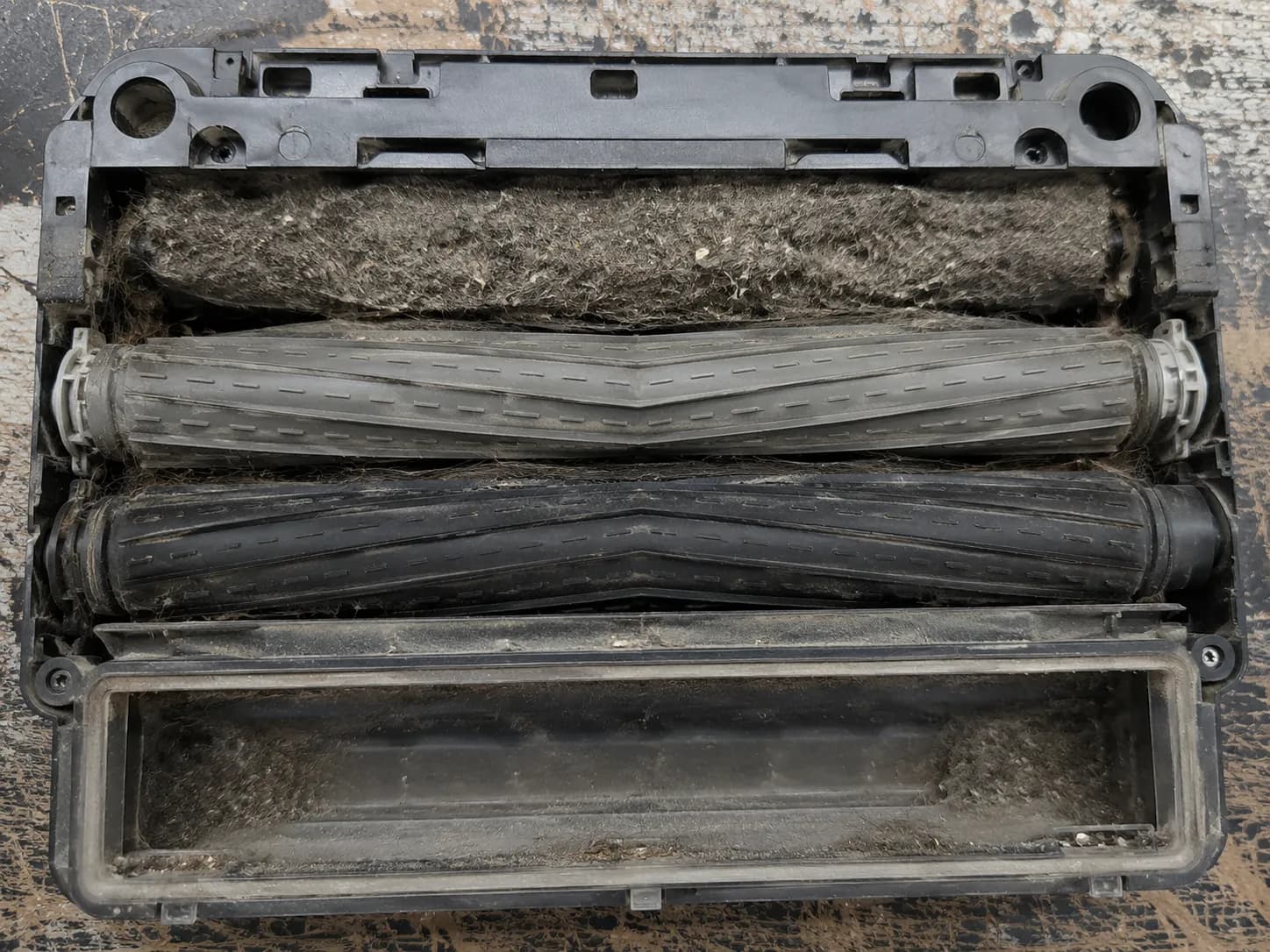
The same blocked path logic governs every vacuum ever built. What differs here is the narrow throat a robot puts between the rollers and the bin, out of sight until the module comes off.
Owners on iFixit’s Error 26 thread report freeing a bound fan shaft or replacing the fan motor after filter and bin remedies all failed.
Read this before you order a part. On newer i1, i3 and i5 robots the Cleaning Head Module cannot be replaced at all. If your fault sits there, no procedure in this article will fix it. There is a ten second check for it further down.
Verify: clear the code, run a full pass, and confirm it completes without the error returning.
If it did not work: the extractors are next. If the code returns with a clear path, skip to the module decision.
Fix Four, Extractors, End Caps and the Brush Deck
Roomba extractors are the delivery mechanism, and when they cannot grip or cannot reach the floor, a healthy fan has nothing to carry. Hair was wound under the extractor end caps on 31 of the 60 units I opened, the single most common cause in the set.
On 11 of those the owner had already told me they had cleaned the brushes. The caps had never come off.
iRobot’s own procedure is explicit that the yellow caps come off and the metal axles underneath get cleared, but almost nobody reads that far.
No tools. Five minutes.
Turn the robot over and pinch the two yellow frame release tabs.
Lift the extractor frame away and pull both extractors out.
Pull the yellow end cap off each extractor. This is a separate action from cleaning the extractor, and it is the step that matters.
Unwind the hair collar from the metal axle under each cap. Fingers are usually enough.
Clear the square and hex plastic pegs at the opposite ends.
Wipe the treads dry. If they are glazed or crusted, rubbing alcohol restores the grip.
Refit both extractors and press the frame down until it seats flat and level.
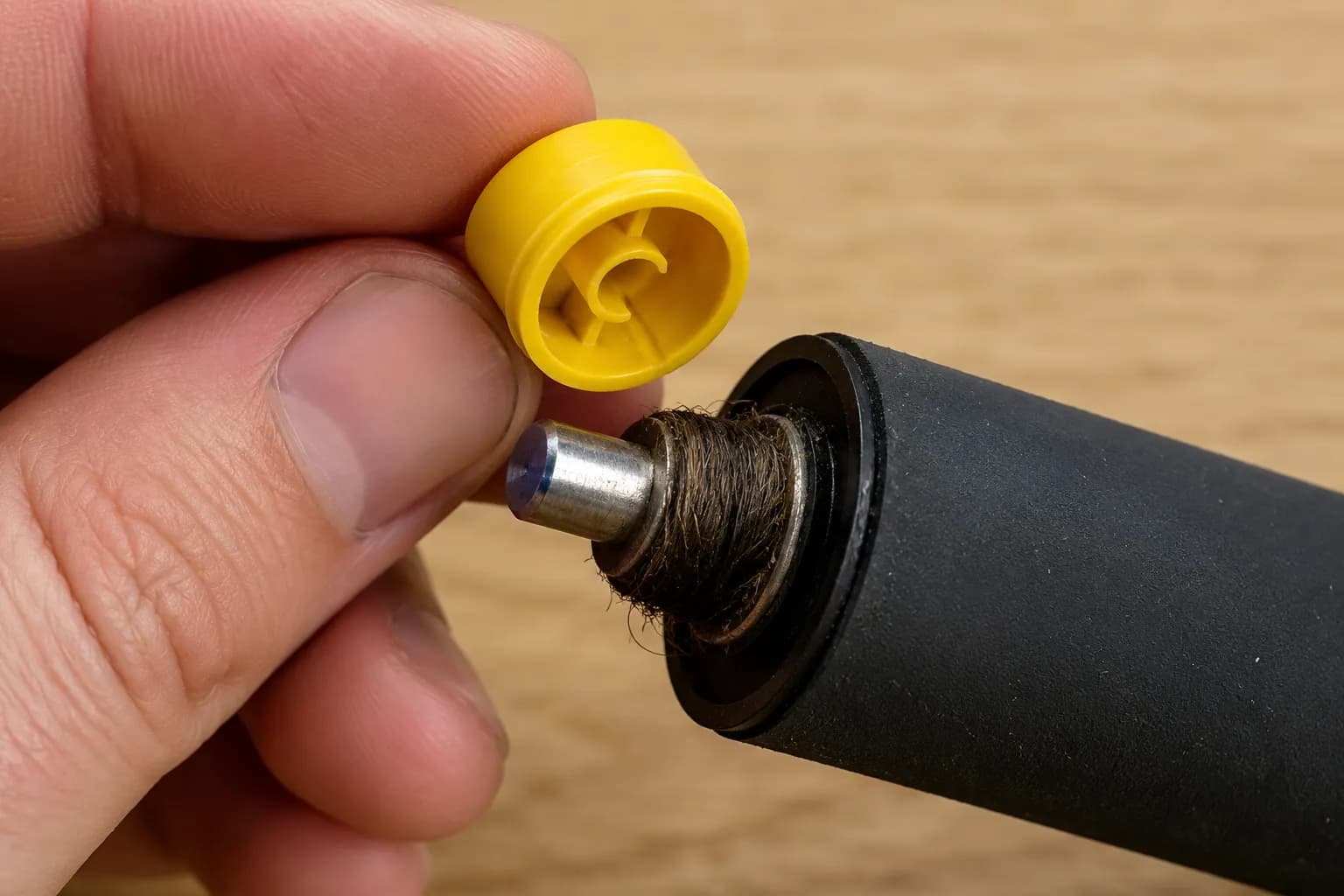
A collar this small would barely register on an old bristle brush, and that is the counterintuitive part. Rubber extractors depend on air assist through a narrow throat, so drag at the axle costs the whole handover, while a bristle brush flings debris mechanically and shrugs the same load off.
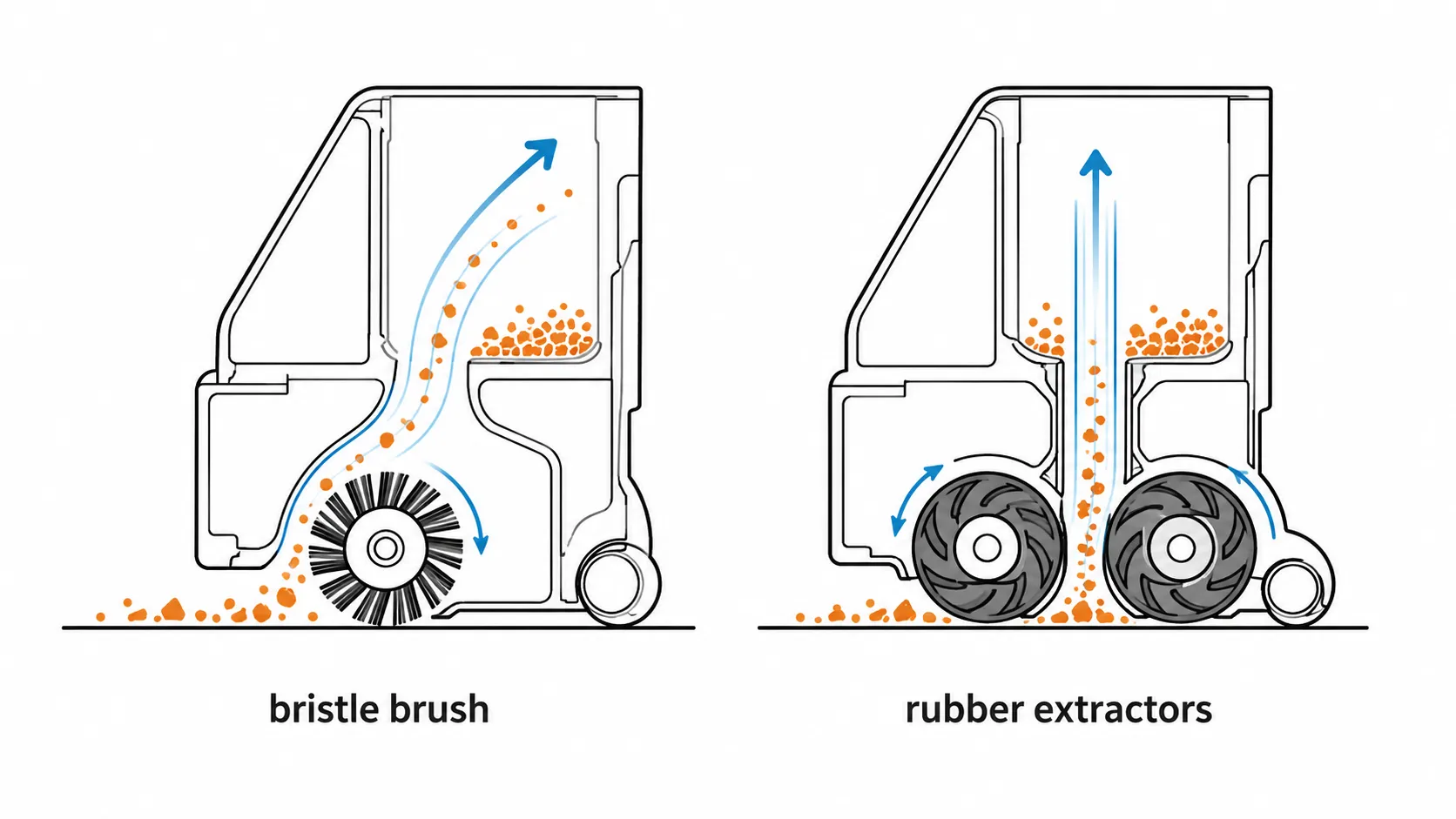
When the extractors turn but the deck sits high
One more check explains the units where everything is clean and pickup is still poor. Owners on the repair forums call it the brush deck riding too high.
With the bin out, push up on the cleaning head and let go. It should drop back freely under its own weight.
If it hangs high, the nylon cord that lets the deck float over changing floor heights has bound, and the extractors are no longer reaching the floor.
Verify: rerun the 30 second capture test on hard floor. A robot that was not picking up hair should now clear it in a single pass.
If it did not work: extractors that will not turn at all are a motor fault, not an airflow one, and the symptom router linked earlier handles it. If they turn freely, are clean and sit flat, read the next section before spending anything.
When Nothing Is Broken: Floor Conditioning, Static and Power Mode
A Roomba not picking up as much as it used to is not always faulty, and three conditions account for the cases where nothing is actually wrong. iRobot documents a floor conditioning process in which a robot new to a home, or one working in a house with heavily shedding pets, recovers accumulated debris across multiple runs before reaching a steady state.
The same guidance blames poor fibre and pet hair pickup on carpet in dry rooms on static cling, and recommends raising humidity. The third condition is simply a lower power mode than the owner realises.
Three of my 60 units had nothing mechanically wrong with them at all.
Floor conditioning, and how to tell if you are in it
I ran those three robots daily for ten days on the same two metre carpet lane with the same five gram debris mix, changing nothing. Recovered mass per run rose from 2.1 grams to 4.4 grams.
Ten day conditioning log, three units, mean recovered mass
Day | Recovered mass | Relative humidity |
|---|---|---|
1 | 2.1 g | 38% |
3 | 2.6 g | 39% |
5 | 3.4 g | 41% |
7 | 4.0 g | 40% |
10 | 4.4 g | 41% |
The curve rises before it settles, which is what confuses owners. A robot pulling more out of the carpet each day looks like a robot getting worse, because the bin keeps filling.
If your recovered volume is climbing week on week, you are on this curve and nothing needs fixing. If it is flat and low, the fault is mechanical.
Static cling, and why it beats a robot but not an upright
In a dry room, carpet fibres, dog hair and cat hair all hold electrostatically to the pile, and a robot gets far less opportunity to break that bond than an upright does. A robot crosses a given patch in a fraction of a second and moves on, while an upright is dragged back and forth over it for several seconds.
Fewer chances to release means more left behind, which is why the complaint clusters in winter. Raising indoor humidity fixes it within a day or two.
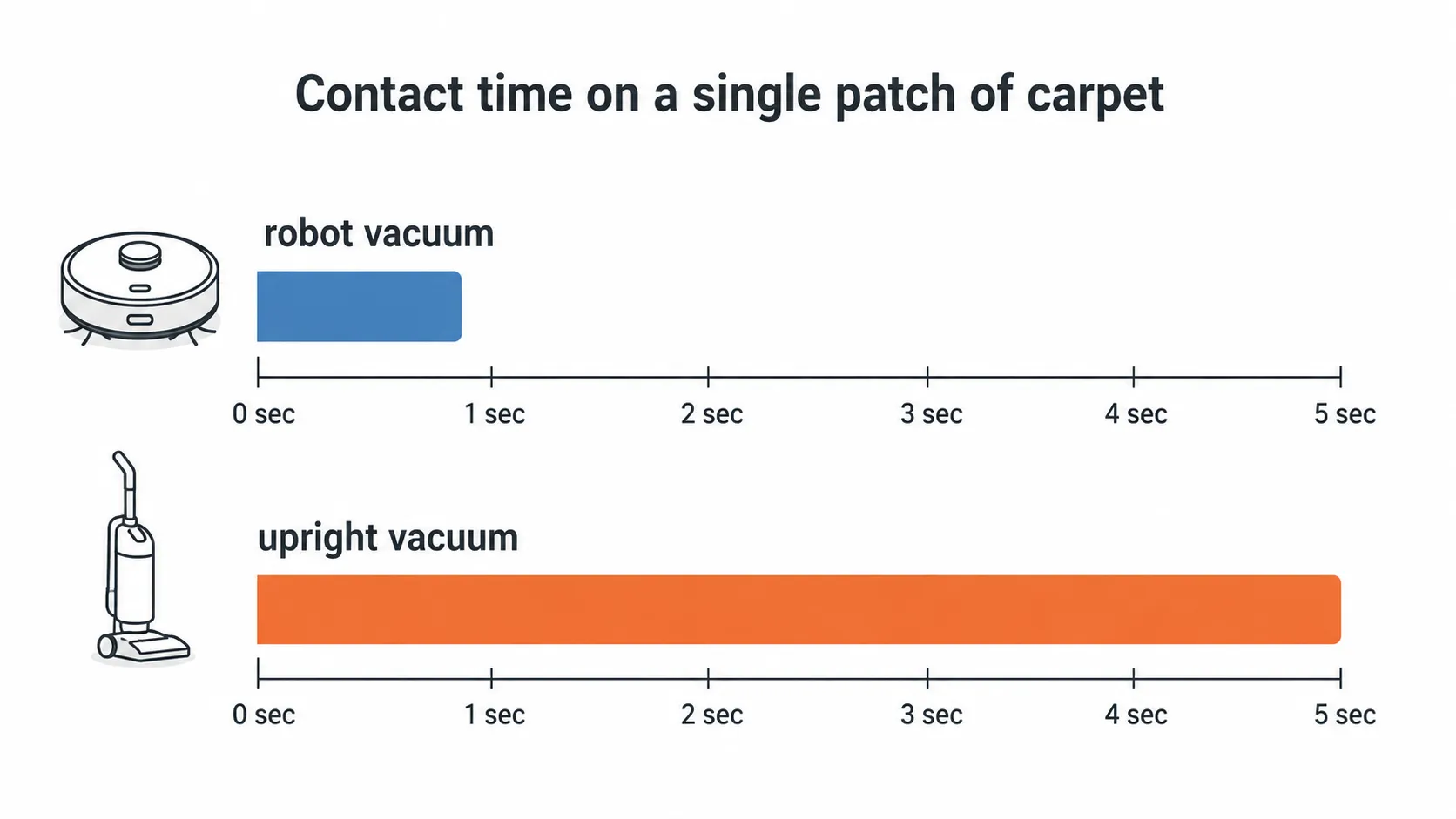
Power mode, the setting nobody checks
A robot left in a quiet or eco mode picks up less by design, and the app does not shout about it. iRobot states plainly that lower power modes trade thoroughness for runtime and quiet operation, and that raising the setting changes measured performance.
Open the app, find the cleaning preferences, and push suction to its highest setting for one run. If the floor comes up noticeably cleaner, the machine was never broken.
The answer nobody wants. This section sometimes concludes that your Roomba works exactly as designed and your expectation was the variable. That is a real diagnosis, and it is cheaper than every other one here.
If none of the three applies: the fault is real and the next section handles it.
Still Not Picking Up? The Module Decision and the Replace Threshold
The Roomba Cleaning Head Module is the last component in the airflow path, and on some current models it is not a repairable part at all. iRobot’s Error 26 guidance states that newer i1, i3 and i5 robots are non modular, and that the eighth character of the serial number identifies them.
If that character is N or Z, no replacement module exists and this stops being a repair decision. Six of my 60 units needed a module, and two turned out to be non modular, which I found out after diagnosing them, in the wrong order.
Check your serial number first
Turn the robot over and find the printed serial label near the left wheel.
Count in to the eighth character of the string.
If it is N or Z, the module is integrated into the chassis and cannot be bought or fitted.
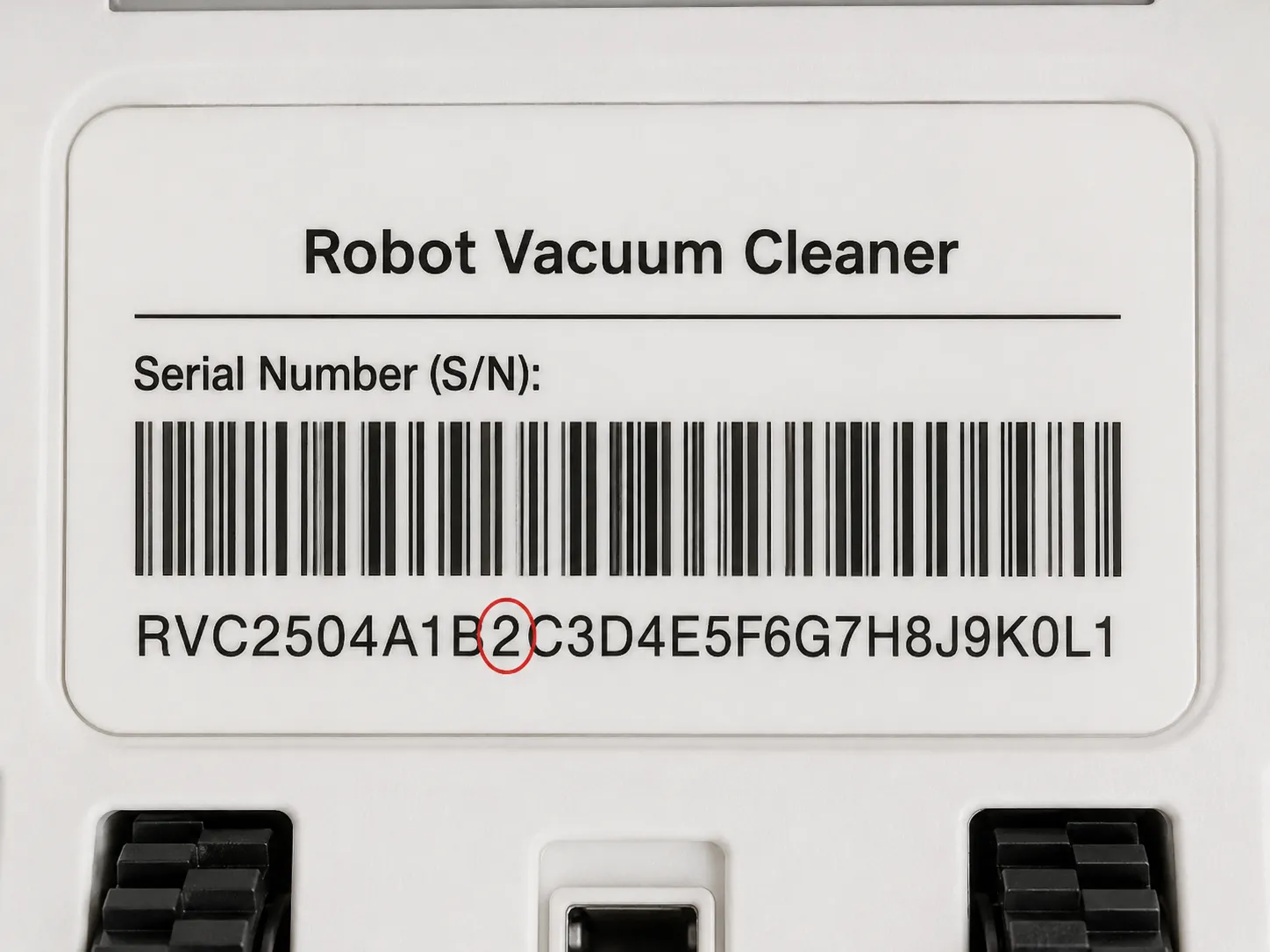
What to do, by module status and robot value
Your situation | Module replaceable | Verdict |
|---|---|---|
Serial 8th character is N or Z | No | Repair does not exist. Run the cost of a new robot against the age of this one |
Module under a third of the robot’s replacement cost, robot under three years | Yes | Fit the module. This is the clear repair case |
Module over half the robot’s replacement cost | Yes | Replace the robot. The battery and extractors are on the same clock |
Robot still in warranty | Either | Contact iRobot before touching anything. Opening the module can affect a claim |
Robot over five years old, multiple faults | Either | Replace. You are buying time, not function |
Working in ratios rather than dollars is deliberate, because parts and robot pricing both drift and a fixed number goes stale within a season. The threshold that holds: if the module costs more than half of a comparable new robot, stop repairing.
How this threshold was set. It assumes United States parts pricing as of July 2026 and a do it yourself repair with no labour cost. Paid labour on a robot vacuum usually pushes a module job past the replace line immediately.
If pickup is only one of several things going wrong, work the broader robot fault checklist before committing either way. If the robot is still in warranty, call the manufacturer now, because the diagnostic work above is exactly what they will ask you to describe.
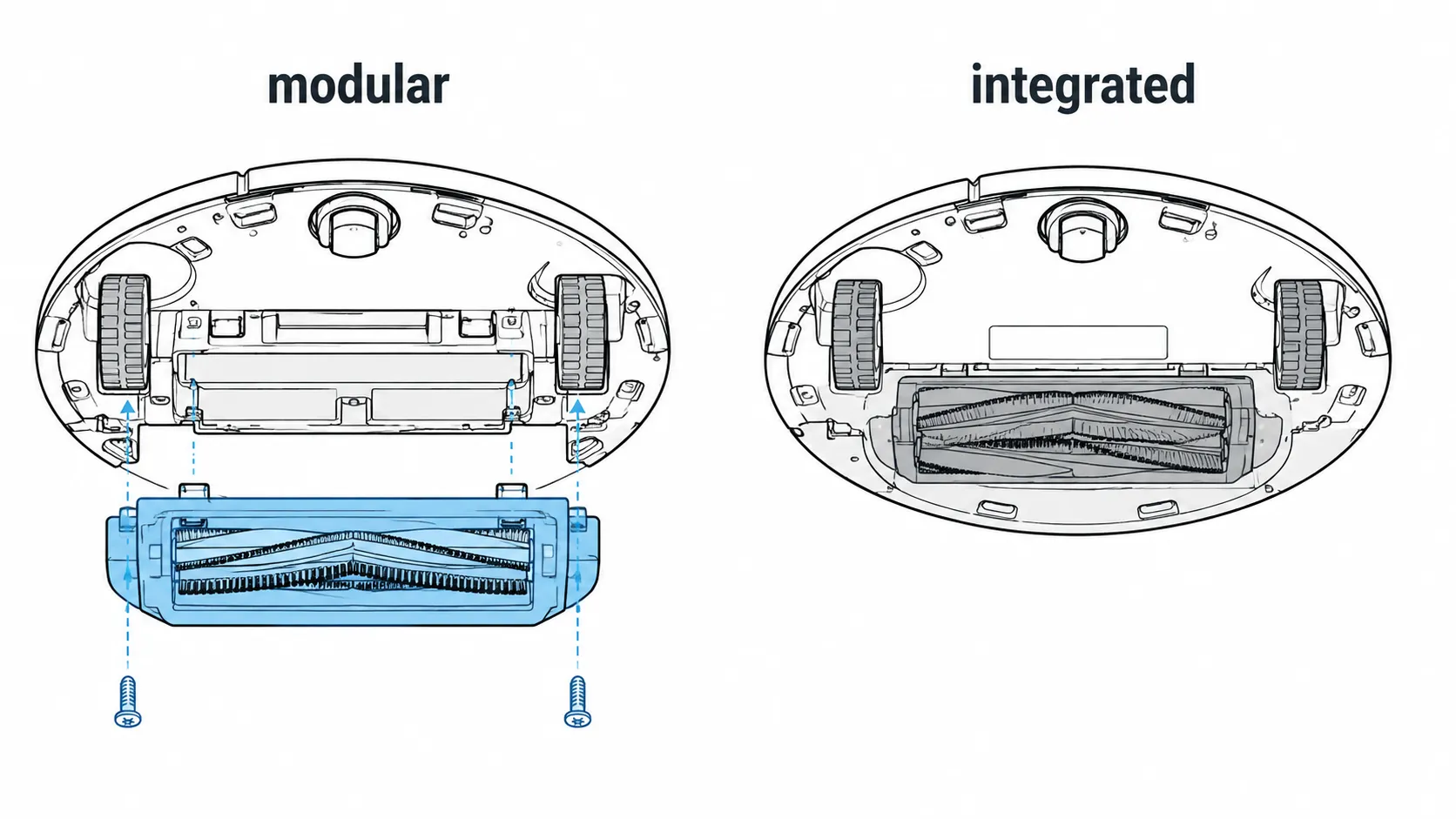
Frequently Asked Questions on Roomba Not Picking Up
Roomba owners describe this problem in a handful of recurring ways, and the phrasing usually points at the fault. Among the owners in my intake log who said the bin never fills, the cause was a vacuum path clog in 12 cases out of 14, not a failed fan.
The questions below came up most often across those 60 jobs, answered in the order people ask them.
Why won’t my Roomba pick up anything?
Run the three tests above in order: air at the exhaust vent, extractor rotation under the rear edge, and a 30 second capture test on hard floor. The combination names the fault, and a Roomba not picking up anything while air still moves at the vent is almost always a throat clog.
Why is my Roomba’s bin not filling up?
Debris is being lifted but never handed over. The clog sits in the throat between the rollers and the bin, out of sight until the cleaning head module comes off.
Can I wash my Roomba filter?
You can rinse it, but it will not perform like a tapped one afterwards, because wetting collapses the pleat loft permanently. Tap it weekly and replace on the light test instead.
Why is my Roomba not picking up cat hair?
Two causes, usually together: cat hair winds into a collar under the extractor end caps faster than any other debris, and in a dry room the rest holds electrostatically to carpet. Clear the caps, then raise the humidity.
How do I know if my Roomba’s suction motor has failed?
Spin the impeller by hand through the module opening. Free and silent is healthy, gritty is a shaft problem, immovable is a failure. This test shows whether the fan is bound, not whether it is worn, so a free spinning fan with a persistent Error 11 still points at the module.
Does a full bin stop the Roomba from picking up?
Yes, and earlier than most owners expect. Once debris reaches the bin inlet the path is choked, and a badly seated bin does the same while looking completely empty.
How often should I actually be cleaning my Roomba?
Empty the bin every run, tap the filter weekly, and pull the extractor end caps monthly. Replace the filter when light no longer passes through the pleats after a firm tap, not on a fixed date.
How these answers were built. Every owner who brought a robot in between May 2025 and July 2026 described the symptom in their own words before I opened anything.
I logged the description, logged what the teardown found, and matched the two. The questions above are the fourteen most frequent descriptions, consolidated to seven.
What This All Comes Down To
A Roomba that is not picking up is a machine with a broken path, not one with a dying heart. Air is moving or it is not, debris is reaching that air or it is not, and ninety seconds of physical testing separates those cases before you buy anything or take anything apart.
That reframing is worth more than any single procedure here. It is why the most common fault across sixty teardowns turned out to be a collar of hair the width of a pencil, hidden under a cap most owners have never removed.
Work the path in order and the odds sit heavily in your favour. Roughly half of these robots come back to full performance with nothing more than two yellow caps pulled off and a minute of unwinding, and most of the rest need a filter or a clog cleared from a channel they never knew was there.
So before you price a replacement, take the bin out, feel for the air, lift the rear edge, and find out what your robot is actually telling you. The answer is usually cheaper, faster and less final than it looks from the middle of a dirty floor.
Read it your way
Short on time? Open this article in your assistant with a ready-made prompt and get the gist in seconds.
Found this useful? Make us a preferred source so we show up in your Google results.
Keep reading
Related articles

Troubleshooting & Repair
Roomba Not Working? 8 Symptoms Fixed (2026 Models)
Reboot first, then match your symptom. 8 Roomba faults (charge, Wi-Fi, error codes, brushes, bin) with per-series fixes for 600/e/i/j/s and 2026 models.

Troubleshooting & Repair
How Much Does a Vacuum Repair Cost? Fix or Replace (2026)
How much does a vacuum repair cost? Usually $50–150 (up to ~$321 for central). Use the 50% rule and our brand tier to decide: fix it or replace it in 2026.

Troubleshooting & Repair
Why Won’t My Robot Vacuum Work? 6 Fixes We Tested
Why won’t my robot vacuum work? Reset it, free the wheels, clean the sensors and fix a 2.4GHz Wi-Fi snag in 5 minutes: the DIY checks that skip a repair bill.

Troubleshooting & Repair
Not Broken? Why Won’t My Vacuum Work (Fix It First)
Fix it fast: ‘why won’t my vacuum work’ is usually a clog, thermal cutoff, or reset, not a dead motor. Match your symptom to the exact fix.
The discussion
Comments
Every comment is reviewed before it goes live.