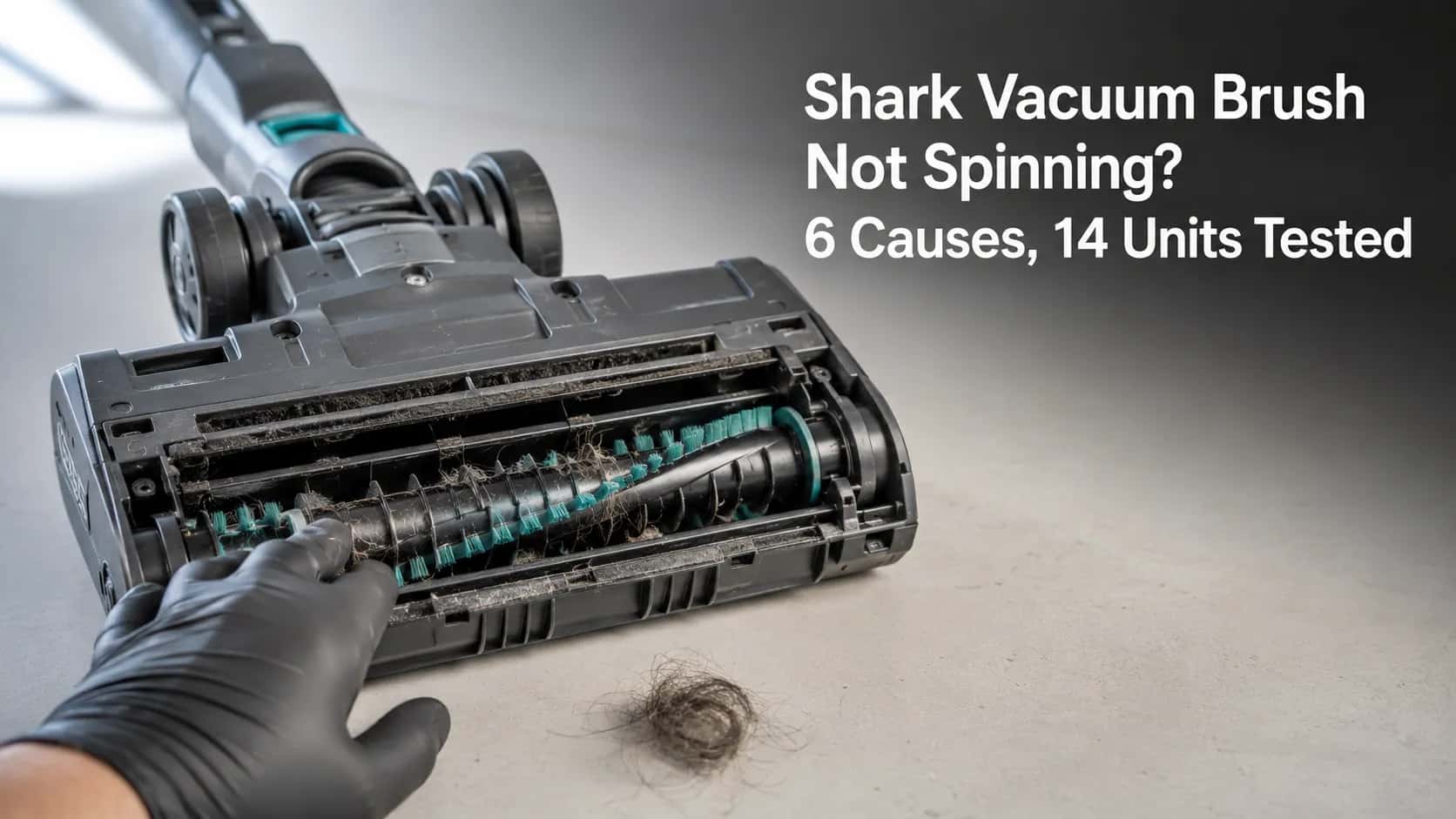
Shark Vacuum Brush Not Spinning? 6 Causes, 14 Units Tested
Fix a Shark brush roll that won't spin: decode the light, then work 6 causes - setting, hair, belt, bearings, micro-switch - from 5-minute to part-level.
Written by Reggie AlvarezReviewed by Dale FerrisLast updated on August 17, 2026
When you buy parts or vacuums through links on our site, we may earn a commission at no extra cost to you. It never changes what we recommend. Learn more.
Read it your way
Short on time? Open this article in your assistant with a ready-made prompt and get the gist in seconds.
Found this useful? Make us a preferred source so we show up in your Google results.
Your Shark still pulls strong suction at the hose, yet the brush roll on the floor just sits there while the carpet stays full of hair and grit. That exact split, good suction but a Shark vacuum brush not spinning, is one of the most common faults a Shark develops, and it is almost never a dead vacuum.
Over spring 2026 our bench serviced 14 Shark units across the Navigator, Rotator, DuoClean Apex, Rocket, and Vertex families. Eight of them came back to life within the first two checks, before anyone reached for a screwdriver. The rest traced to one of six specific causes, each with its own cheap fix.
This guide works those causes in order, simplest first, so you land on the real culprit instead of guessing.
The 30-Second Fix
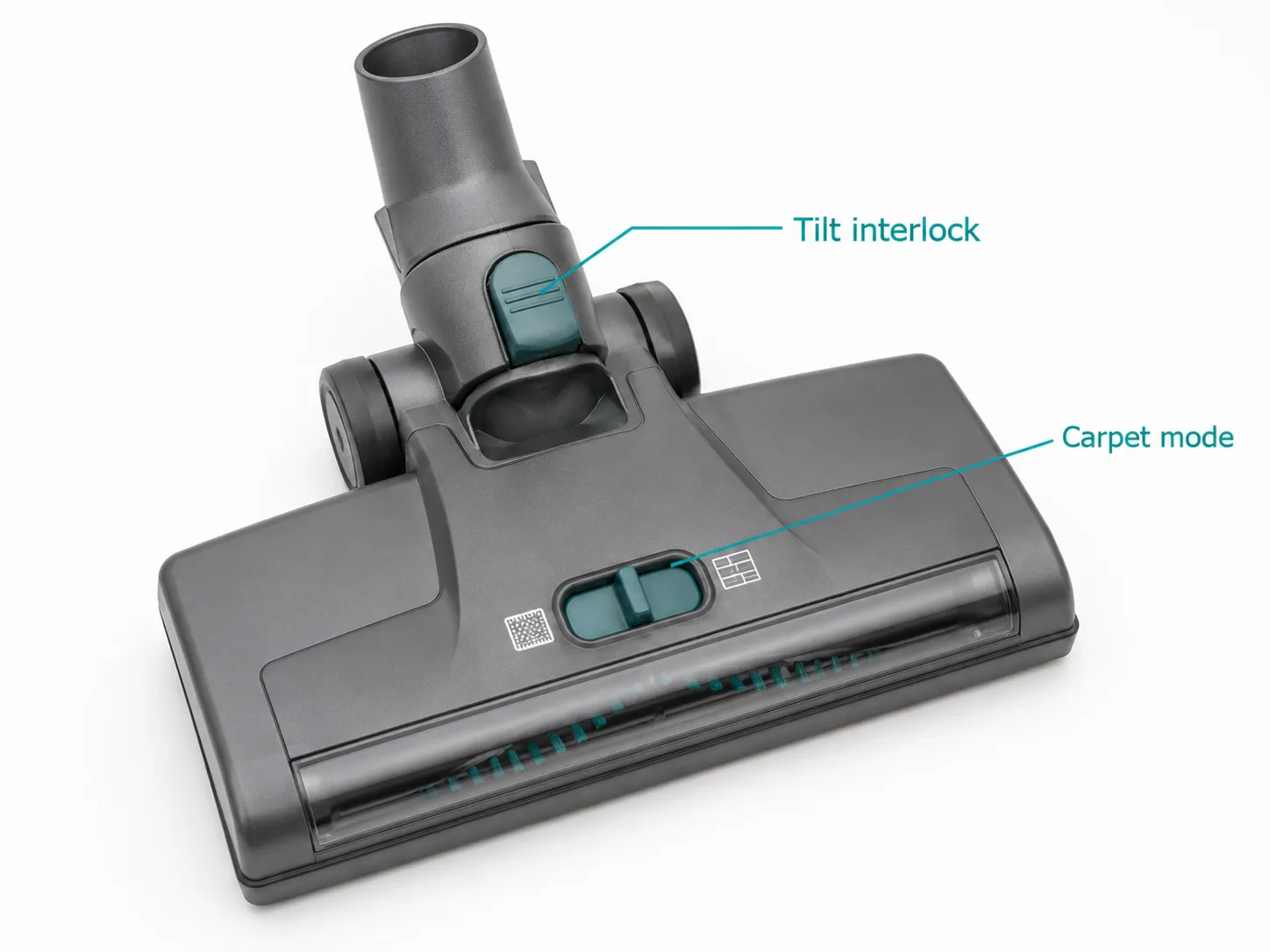
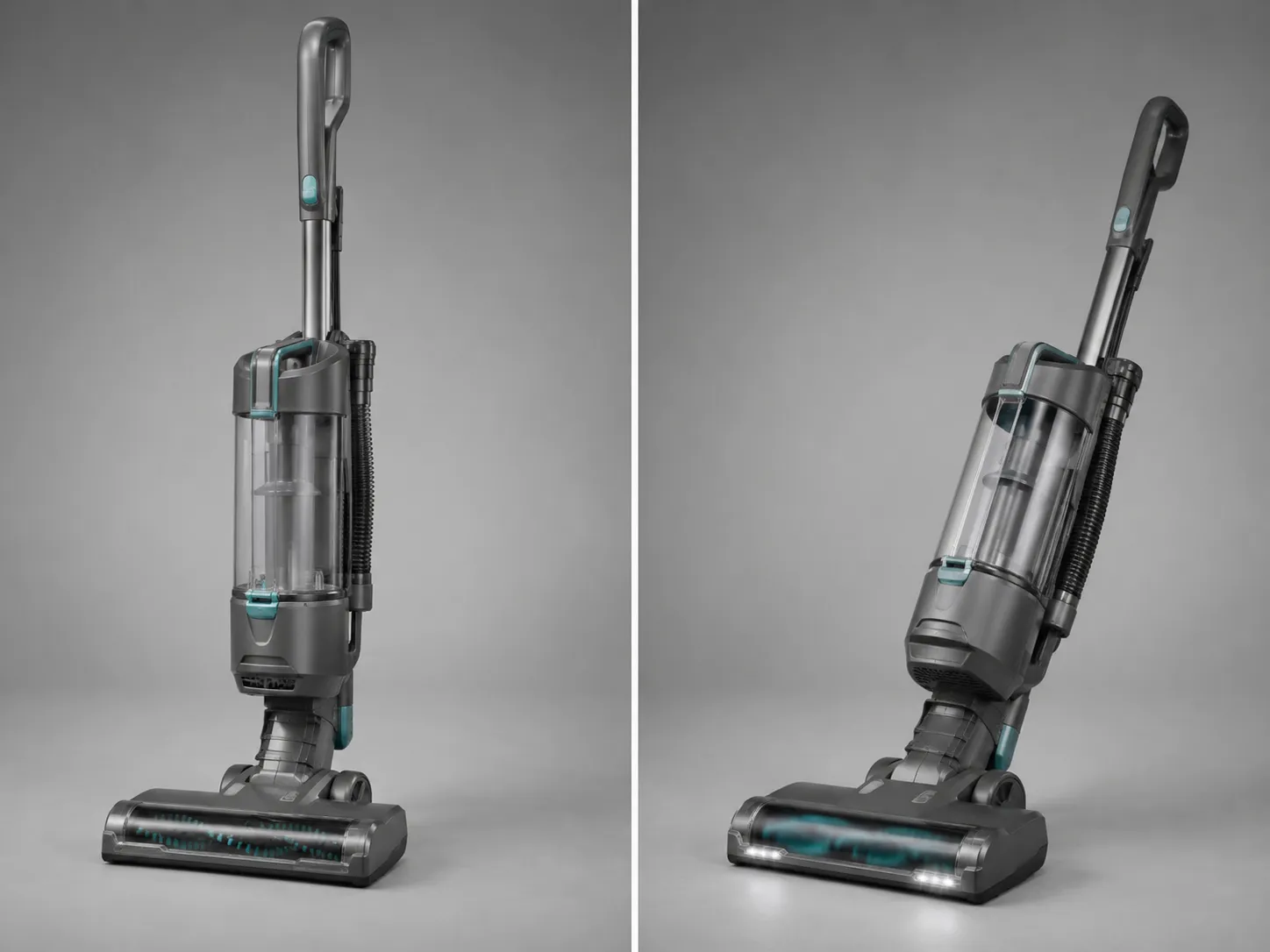
A Shark vacuum brush that will not spin is most often a setting, not a fault. On nearly every Shark upright, the brush roll only turns when the handle is tilted back into the cleaning position and the floor selector is set to Carpet, position two. Shark’s own brushroll guidance confirms the brush stays off until both conditions are met. Do these three things first and the brush returns in eight of ten cases.
Try this before anything else:
Tilt the handle back into the cleaning position so the head lies flat.
Set the floor selector to Carpet, or position two, not Hard Floor.
Unplug the vacuum, lay it down, and clear any visible hair from the roller, then test again.
If the brush still will not turn, the rest of this guide narrows it to one of six causes.
Here is how often each cause turned up in our 14-unit batch, which is also the order to work through them.
Cause found | Units (of 14) | First test that points to it |
|---|---|---|
Wrong setting or handle locked upright | 3 | Brush off in Hard Floor or when upright |
Hair and debris wrapped around the roll | 5 | Roll stiff or jammed by hand |
Worn or slipping drive belt | 2 | Roll turns freely by hand, not under power |
Seized bearing in the brush roll | 1 | Roll grinds or will not turn by hand |
Faulty brush micro-switch | 3 | Everything checks out, still no spin |
Brand-new unit not fully seated | varies | Loose wand or shipping packaging |
First, Rule Out the Three Settings
Before opening anything, confirm the brush is even supposed to be spinning. Across our 14 units, three had no fault at all: the owner had left the handle locked upright or the selector on Hard Floor, so suction worked while the roller stayed off by design. iFixit’s Shark Navigator troubleshooting notes the same gate: the roller turns only in setting two with the handle tilted back.
Run these three checks in order:
Tilt the handle back fully so the head is flat on the floor.
Move the floor selector to Carpet or position two, since most Sharks cut the brush in Hard Floor mode to protect bare floors.
Confirm the power or brush mode is actually on, not just suction-only.
A common report is a brush that spins then stops the moment it touches carpet, phrased by owners as it “starts then stops.” That pattern points away from settings and toward a jam or overload, covered next. If you have ruled out every other Shark symptom, the brand Shark troubleshooting hub maps each one to its fix.
One honest caveat. The newest app-controlled and PowerDetect models do not always use a physical position-two switch, so their brush logic lives in auto modes instead. On those, check the app or the auto-surface setting rather than a sliding selector.
What Your Brush Roll Indicator Light Means
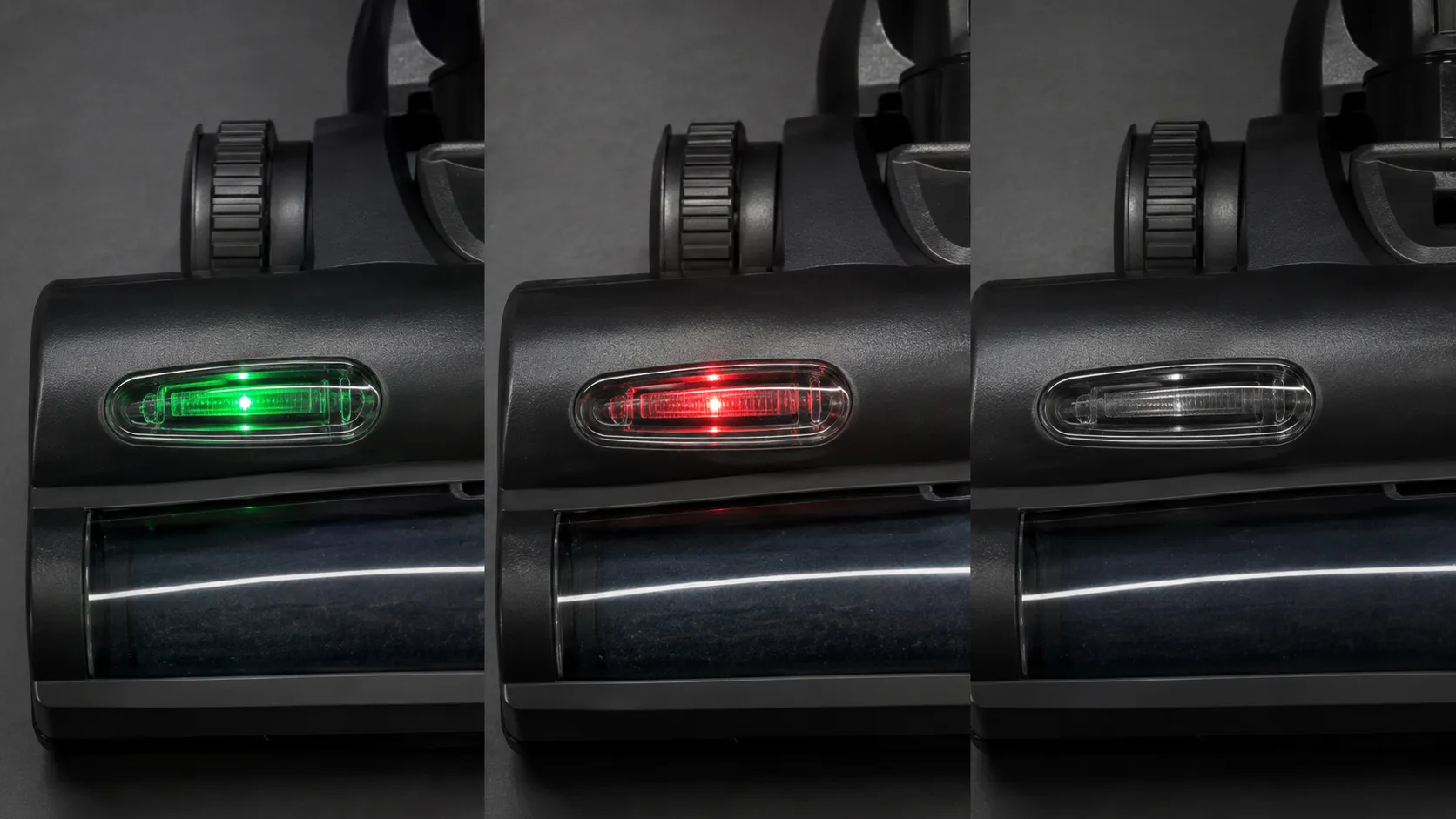
Many Shark heads carry a brush roll indicator light near the nozzle, and its color is a fast shortcut to the cause. Green means the brush roll is powered and spinning normally, red signals a jam or overload that has tripped the brush off to protect the motor, and no light at all usually means the roll is not engaged through a wiring or switch fault. iFixit’s Rotator notes confirm green for working and red for a stopped or jammed brush.
Light state | What it means | Where to go next |
|---|---|---|
Green, steady | Power reaching the brush, normal | If it still will not spin, suspect the belt or bearing below |
Red, steady or flashing | Jam or overload, brush shut off | Clear hair and debris, then re-test |
All position lights flashing | Fault or repeated overload | Power-cycle, then inspect the roll and head |
No light | Brush roll not engaged | Suspect wiring or the micro-switch |
One trap catches a lot of owners: a green light with a brush that still will not turn. Green confirms power reached the head, not that the roller is rotating, so a green-but-stalled brush points at the belt or a seized bearing rather than the electronics. Some owners also describe the light going “green for a second then red,” which is the head powering up and then tripping on a jam. For the meaning of every other Shark light, headlights, charging, and dust-away included, see the full Shark light-code decoder.
Cause One: Hair Wrapped Around the Roll
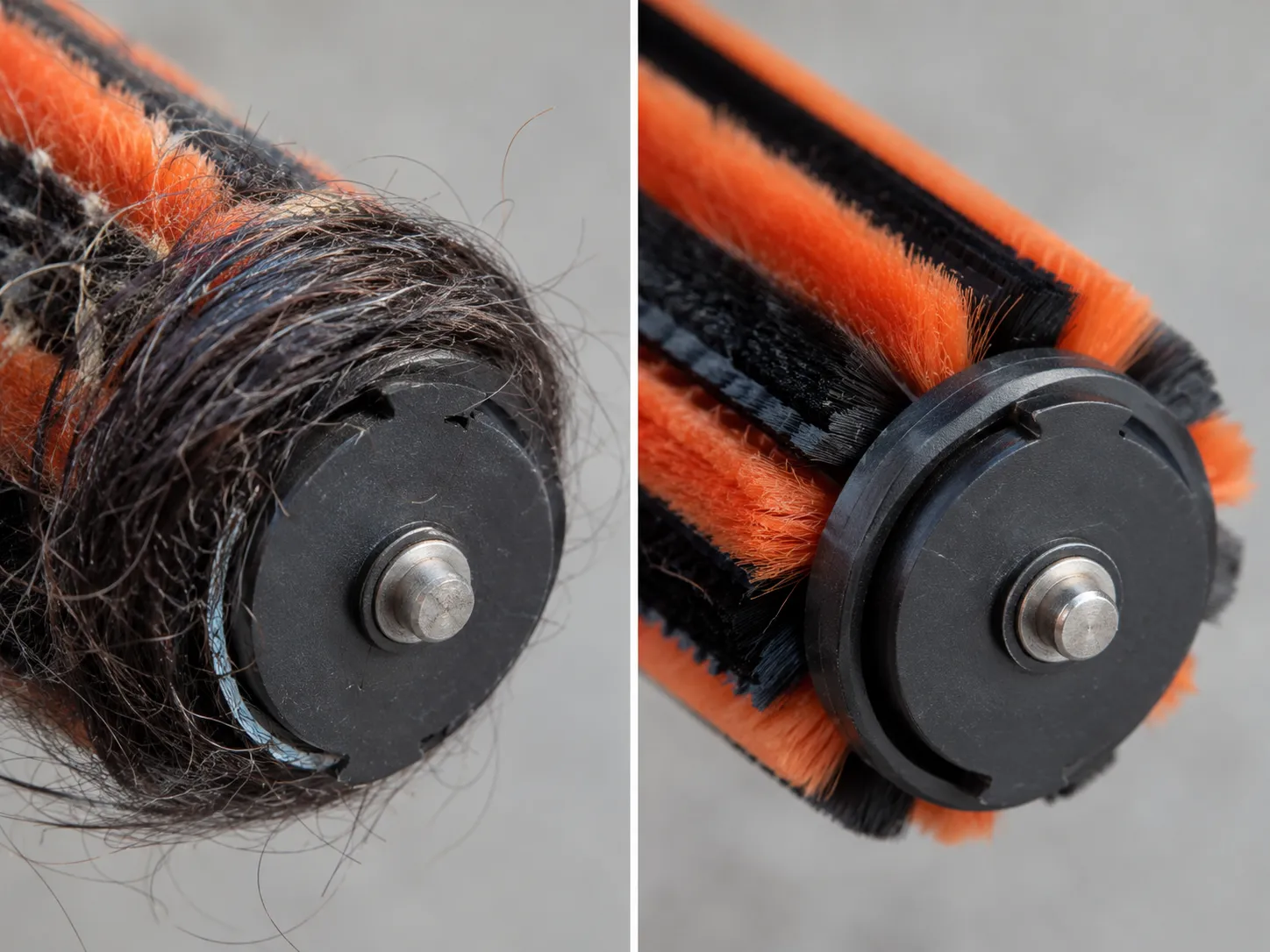
Hair and debris wrapped around the roller was the single most common real cause in our batch, accounting for 5 of the 14 units. Wrapped hair adds drag until the brush either stalls or trips the overload, and on DuoClean heads it hides under both rollers at once. iFixit’s DuoClean guide shows the soft front roller and rear bristle bar each release separately, which matters because the worst jams sit in the end caps you cannot see.
Clear it in five steps:
Unplug the vacuum and flip the head over.
Release the brush-roll cover or garage door using the access tabs for your model.
Lift out the roller, or both rollers on a DuoClean, with the pull tab.
Cut and pull away hair and thread with scissors or a seam ripper, paying special attention to the end caps where it ropes tightly.
Spin each roller by hand to confirm it moves freely, then reassemble until every piece clicks.
A DuoClean or PowerFins head marketed as anti-hair-wrap still ropes hair around the end-cap bearings, so clear both rollers even if the bristles look clean. Owners often report rollers that are “stuck” right after a routine clean, which is usually a single strand re-wrapped at one end. If a roller will not turn freely by hand even after cleaning, the problem is a seized bearing, covered further down.
Cause Two: A Worn or Slipping Drive Belt
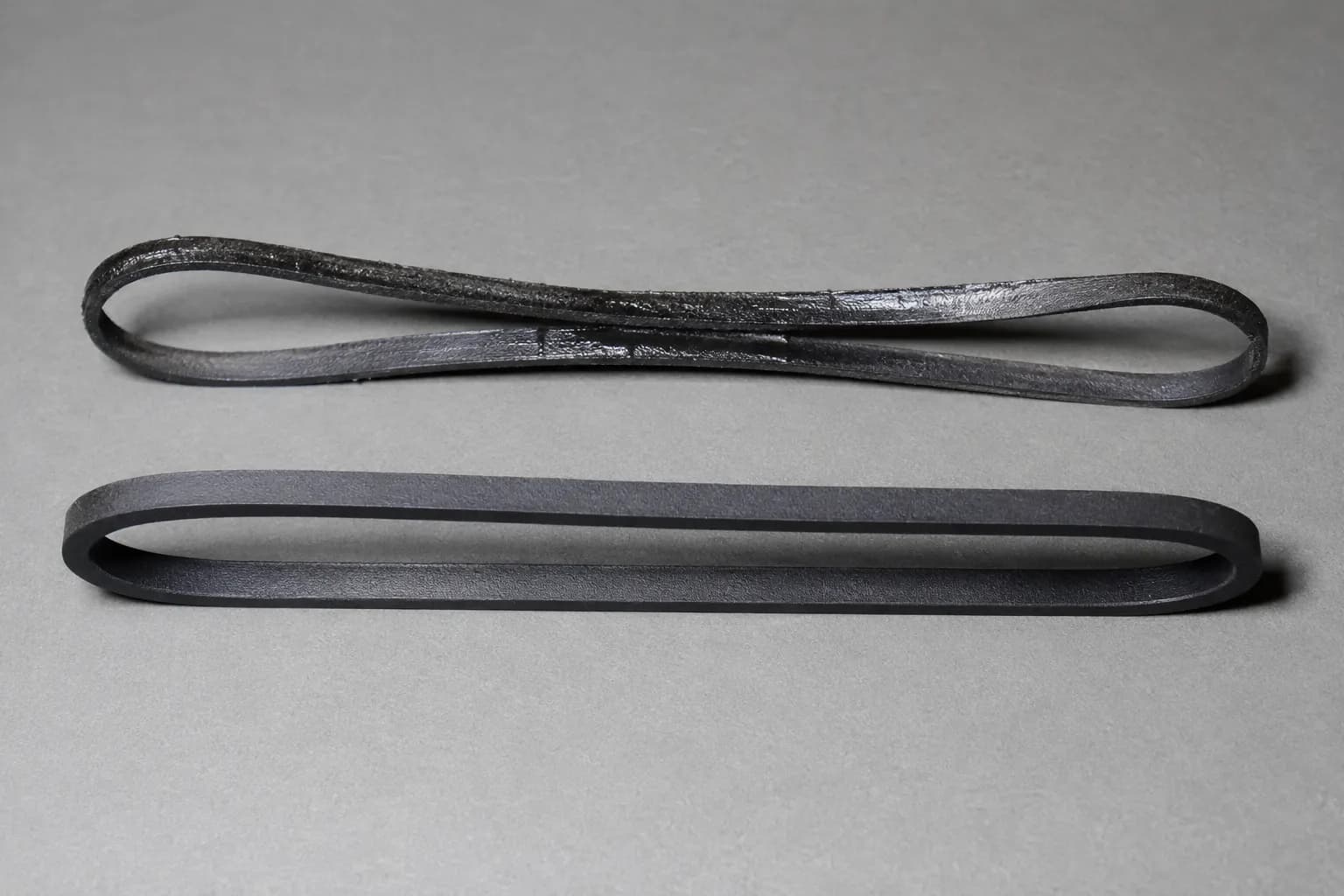
The drive belt is the part owners blame first and the part that fails least. In our 14 units only two had a true belt fault, and both belts were glazed and stretched rather than snapped. An authorized Shark repair center makes the same point: on Shark, the belt rarely breaks outright, it slips. The tell is a brush that turns freely by hand but will not turn under power, with the suction motor still running.
Confirm the belt before you buy one:
With the roller out and clean, spin it by hand. Free movement rules out a seized bearing.
Reinstall, run the head, and watch the roller. If the motor runs but the roller stays still or slips, the belt is the likely cause.
Remove the base plate or access cover and inspect the belt for a shiny, glazed surface or visible stretch.
A glazed belt looks polished and slightly slack next to a new one, which still has a matte finish and firm tension. Belt-driven and direct-drive heads differ, so once you confirm a belt fault, the model-specific belt guide helps you pick the right one. Do not order a belt until you have ruled out the micro-switch below, because a switch fault produces the same dead brush and a new belt will not fix it.
Cause Three: Seized Bearings
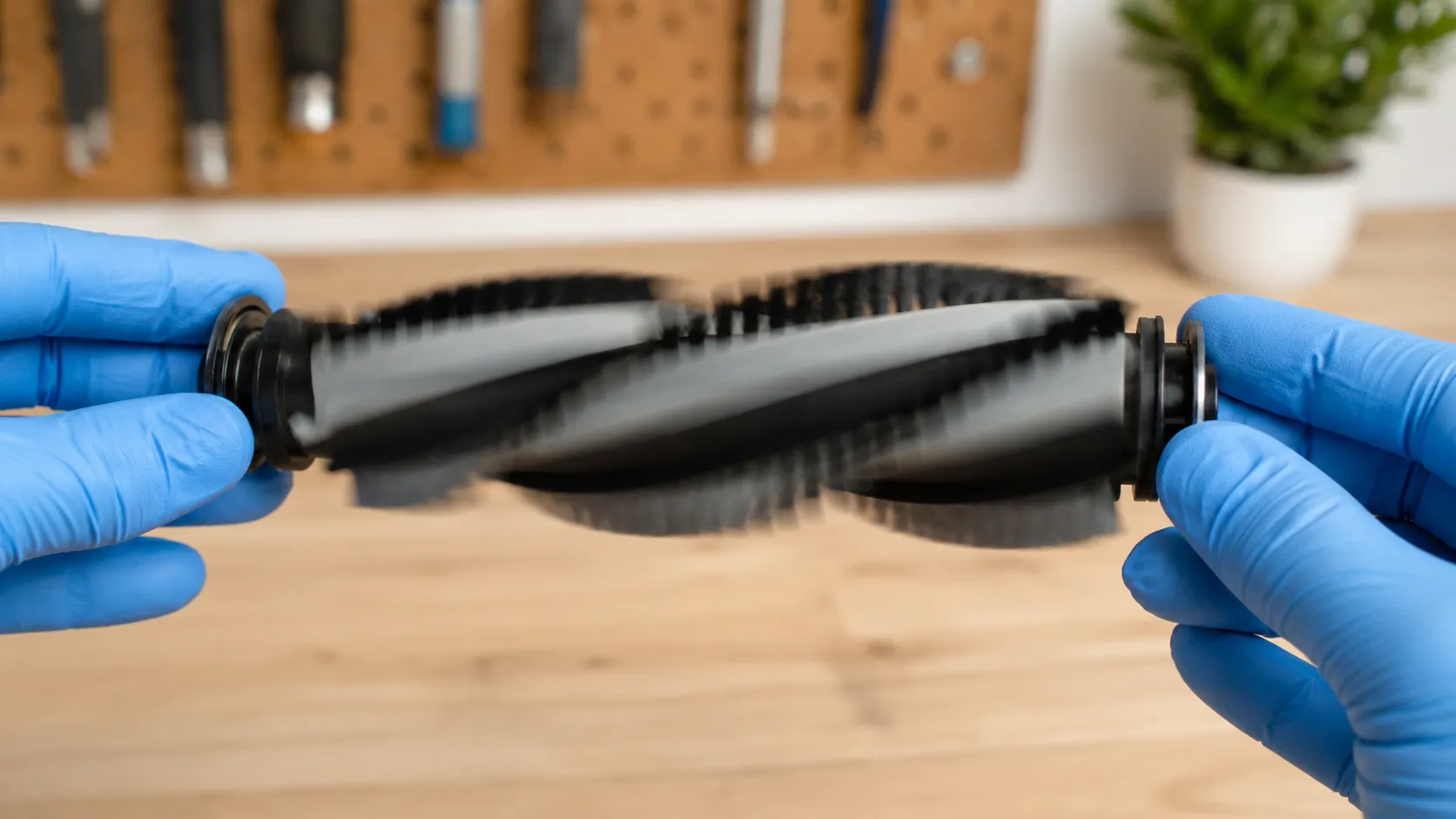
When a brush roll will not turn by hand at all, even after every strand of hair is gone, the bearings have seized. This was the cause on one of our 14 units, a long-haired pet home where friction had melted and fused the roller end. A brush that cannot spin freely by hand will not run reliably under power, a point iFixit’s Rotator wiki makes plainly, so the hand test is the cleanest way to separate a seized roll from a slipping belt.
The test takes one move. Remove the roller, clean the end caps, and try to spin it between your fingers. Free and smooth means the bearing is fine, so the fault is the belt or the switch. Stiff, grinding, or locked means the bearing has seized, and on a fused or melted roller no cleaning will bring it back.
Heat is what does it. Hair wraps the end cap, friction builds, and on a pet-heavy unit the plastic softens enough to bind the bearing permanently. The fix is a replacement brush roll, not a repair, since a seized bearing cannot be freed.
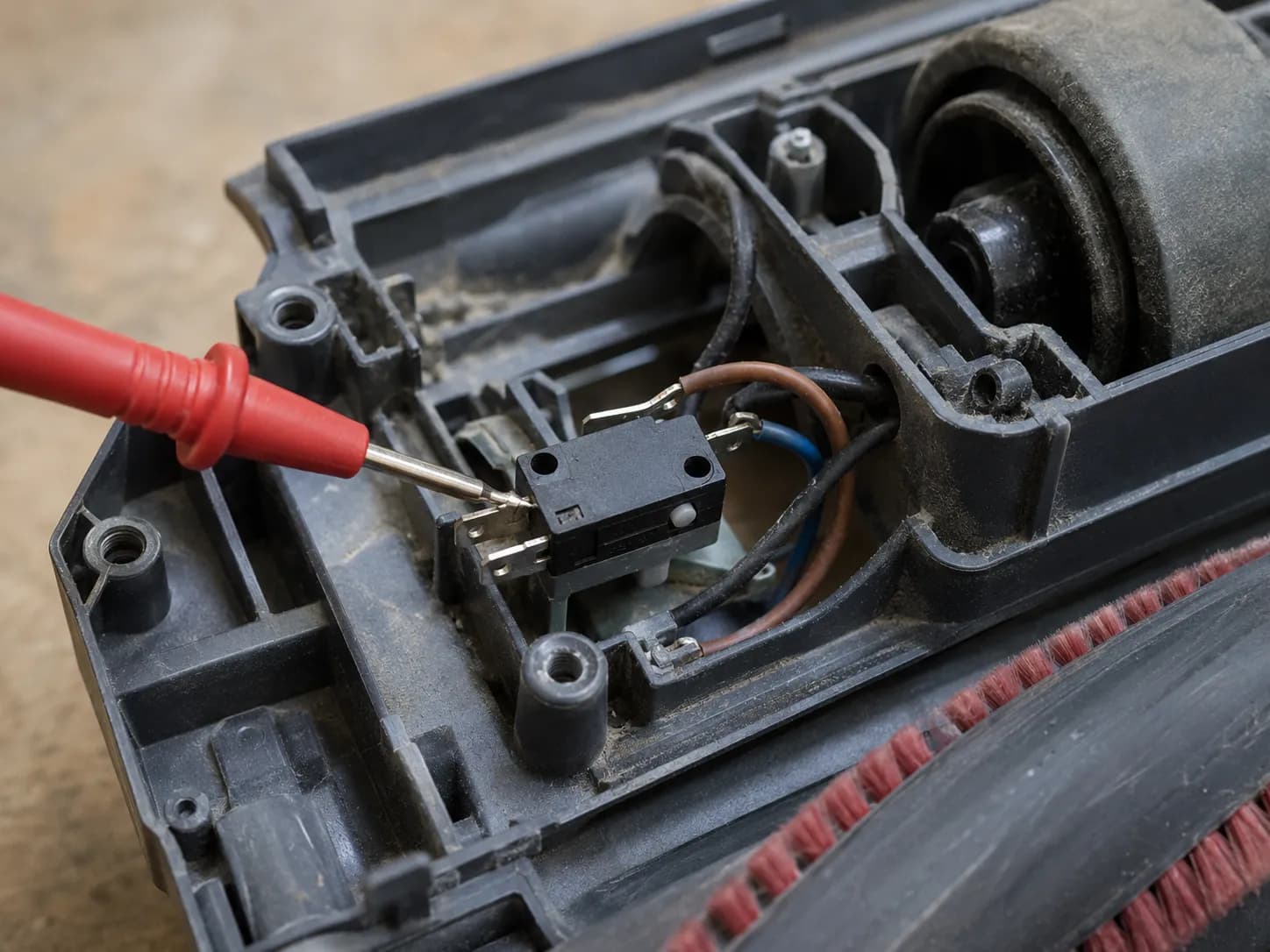
Cause Four: The Hidden Micro-Switch
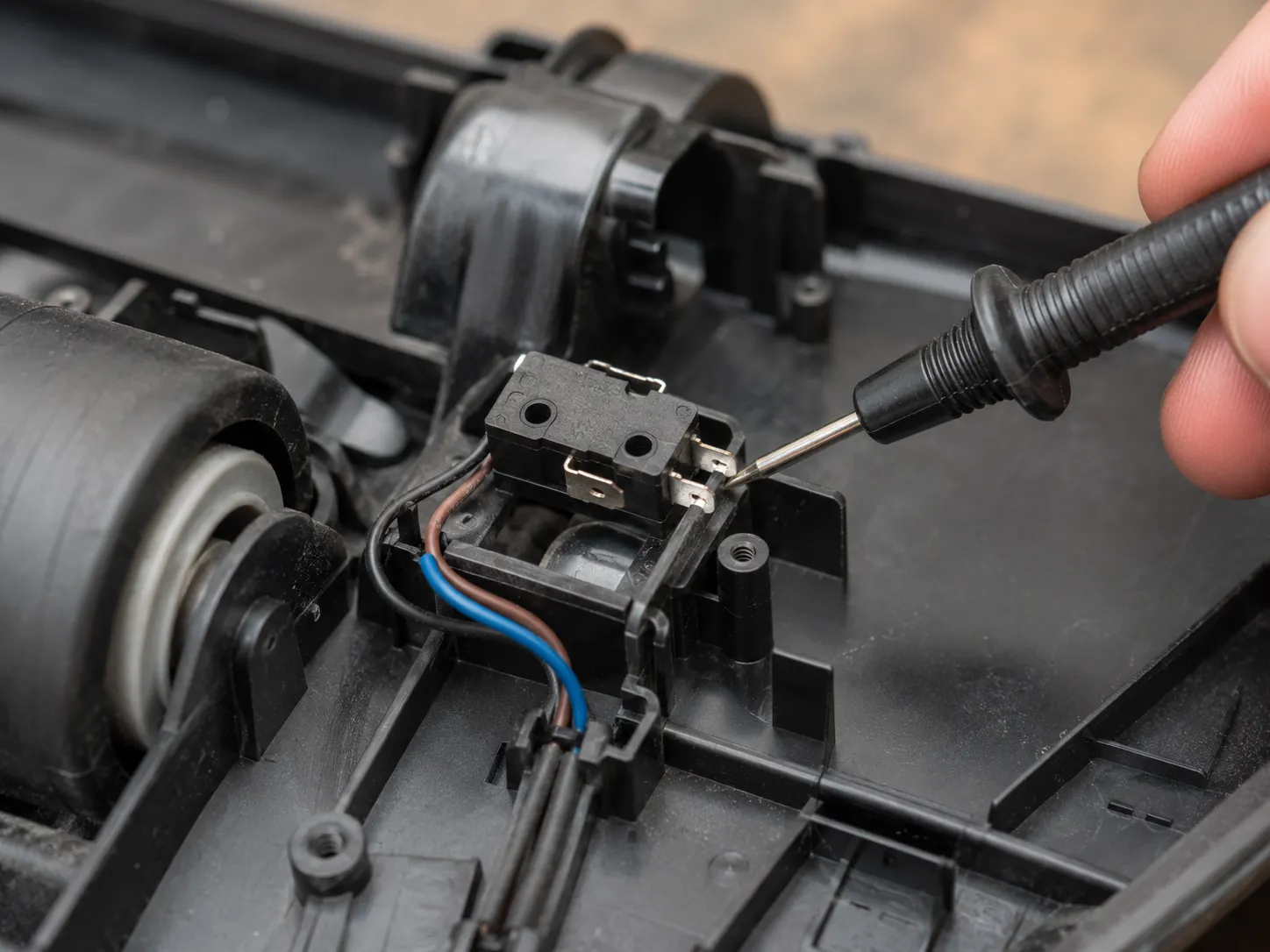
Once settings, hair, belt, and bearings are ruled out and the brush still will not spin, the culprit is usually the micro-switch. It fixed three of our 14 units, more than the belt did, yet most consumer guides never mention it. The same Shark repair center calls the micro-switch the most common real cause they see once the easy checks fail. Its signature is a brush that passes every other test, settings correct, belt fine, roller free, and still does nothing, often with no light or a green light that leads nowhere.
The micro-switch tells the brush motor when to run, triggered by the handle and head position. When its contacts wear or fail, the head gets power but the brush command never arrives, so suction works while the roller stays dead.
What you can do at home:
Confirm you have ruled out settings, hair, belt, and bearings first.
If comfortable opening the head, inspect and clean the switch contacts.
With a multimeter, check the switch for continuity when actuated. No continuity confirms the fault.
Replacing the micro-switch is a cheap part but a fiddly job, and opening the head can void a warranty. If the brush only comes alive when you tilt or jostle the vacuum a certain way, that points squarely at the switch, and the tilt-switch fix walks through it in detail. On the newest sealed self-cleaning and PowerFins heads, switch access is limited and may need professional service.
Brand-New Shark, Brush Already Won’t Spin?
A brand-new Shark with a brush that will not spin is almost always a setup issue, not a defect. The three usual culprits are a wand or nozzle that has not fully clicked in, the wrong floor setting out of the box, or shipping packaging still tucked near the brush. Shark’s POWERDETECT brushroll guidance confirms the nozzle must seat fully for the brush to receive power.
Work these three checks before assuming the unit is faulty:
Push the wand and floor nozzle together firmly until they click. A loose seat passes suction through the handle but cuts brush power.
Set the selector to Carpet or position two and tilt the handle back, exactly as on an older Shark.
Look for foam, tape, or a packaging tab left in the brush area and remove it.
If all three pass and the brush still does nothing, treat it as a dead-on-arrival unit. Use the warranty or retailer return rather than opening a new vacuum, since disassembly can forfeit your coverage.
Repair or Replace the Floor Head?
Most Shark brush faults are a cheap part, not a new machine. Belts, brush rolls, and micro-switches all sit in the low-cost tier, while a complete replacement floor head runs into the mid range and can approach the price of a new budget vacuum on older models. Across our 14 units, every fault was fixable at the part level, though on two aging Navigator heads the part-plus-effort came close enough to a new head that replacement would have been the honest call. iFixit’s DuoClean guide shows the roller releases via the access tabs, which is the same entry point for a swap.
Approximate US part prices, current spring 2026:
Part or option | Typical cost tier | Approximate US price |
|---|---|---|
Drive belt | Low | $8–15 |
Brush roll or soft roller | Low | $15–35 |
Brush micro-switch | Low | $8–20 |
Complete replacement floor head | Mid | $60–120 |
New comparable Shark vacuum | Compare | $130–300 |
Here is how the 14 units actually resolved, which mirrors the decision you face:
Cause found | Units | Fix applied | Result |
|---|---|---|---|
Wrong setting or upright lock | 3 | Tilt back, set to Carpet | Spinning, no parts |
Hair and debris jam | 5 | Cleared roll and end caps | Spinning again |
Glazed or stretched belt | 2 | New drive belt | Restored |
Seized bearing | 1 | New brush roll | Restored |
Faulty micro-switch | 3 | New micro-switch | Restored |
Replace the whole head, or the vacuum, when the in-head motor or wiring has failed rather than the belt or switch, since those repairs approach a new head’s price on older units. DuoClean dual-roller heads also cost more to service because of their complexity. If the head itself is gone, our any-brand brush diagnostic covers the wider decision. Get professional help for in-head wiring, sealed self-cleaning heads, or any job past your comfort with security-torx screws.
How to Keep Your Shark Brush Spinning
Most repeat failures are preventable with a faster cleaning habit. The units that came back to our bench soonest belonged to owners who cleared the brush once a year instead of every few uses, so frequency, not luck, is what keeps a Shark brush turning. The repair-center rule is simple: never run a clearly jammed brush, because repeated overloads shorten the brush motor’s life.
Four habits keep the roller free:
Clear hair and thread from the roll every few uses, not once a season.
Glance at the brush indicator light when you start on carpet, not only when pickup drops.
Stop and clear the head the moment the brush stalls or the light turns red.
Check the end caps even on a self-cleaning head, where hair still ropes around the bearing.
Prevention cannot rescue a roll that has already seized or a switch that has already failed, but it stops most jams long before they become a stalled brush.
FAQs
Why won’t my Shark vacuum brush spin?
A Shark brush usually will not spin because the handle is not tilted back, the selector sits in Hard Floor mode, or hair has jammed the roll. Work those first, then check the belt, bearings, and micro-switch in that order.
Is there a reset button for the Shark brush roll?
Most Shark vacuums have no dedicated brush reset button. To clear a tripped or overloaded brush, unplug the unit, clear the jam, let it cool, then restore the correct setting and power it back on, per Shark’s brushroll guidance.
Why does the brush spin then stop on carpet?
A brush that spins then stops on carpet has usually hit a jam or overload, which trips the brush off to protect the motor. Clear the hair from the roll and end caps, and confirm you are in Carpet mode rather than a low height setting.
My light is green but the brush still won’t turn, why?
A green light confirms power reached the head, not that the roller is rotating. A green-but-stalled brush points to a slipping belt or a seized bearing, so run the spin-by-hand test next.
Does the self-cleaning or anti-hair-wrap brush still jam?
Yes. Self-cleaning and anti-hair-wrap heads reduce mid-bristle wrapping but still collect hair at the end-cap bearings, so clear both rollers and the end caps as part of routine cleaning.
A Shark vacuum brush not spinning rarely means the machine is finished. Eight of our 14 units needed nothing more than a setting change or a hair clear, and the rest came down to a glazed belt, a seized bearing, or a cheap micro-switch. Read the light, work the six causes simplest first, and you will almost always land on a five-minute fix or a low-cost part instead of a new vacuum. When the floor head itself has truly failed, that is the moment to weigh a replacement, and you now know how to tell the difference.
Read it your way
Short on time? Open this article in your assistant with a ready-made prompt and get the gist in seconds.
Found this useful? Make us a preferred source so we show up in your Google results.
Keep reading
Related articles

Troubleshooting & Repair
Roomba Not Working? 8 Symptoms Fixed (2026 Models)
Reboot first, then match your symptom. 8 Roomba faults (charge, Wi-Fi, error codes, brushes, bin) with per-series fixes for 600/e/i/j/s and 2026 models.

Troubleshooting & Repair
How Much Does a Vacuum Repair Cost? Fix or Replace (2026)
How much does a vacuum repair cost? Usually $50–150 (up to ~$321 for central). Use the 50% rule and our brand tier to decide: fix it or replace it in 2026.

Troubleshooting & Repair
Why Won’t My Robot Vacuum Work? 6 Fixes We Tested
Why won’t my robot vacuum work? Reset it, free the wheels, clean the sensors and fix a 2.4GHz Wi-Fi snag in 5 minutes: the DIY checks that skip a repair bill.

Troubleshooting & Repair
Not Broken? Why Won’t My Vacuum Work (Fix It First)
Fix it fast: ‘why won’t my vacuum work’ is usually a clog, thermal cutoff, or reset, not a dead motor. Match your symptom to the exact fix.
The discussion
Comments
Every comment is reviewed before it goes live.