Vacuum Brush Not Spinning? 6 Ranked Causes (Any Brand Fix)
Fix a vacuum brush not spinning fast: 6 causes ranked hair to motor, the turn-by-hand and run-the-head-direct tests, plus when to replace vs repair.
Written by Reggie AlvarezReviewed by Dale FerrisLast updated on August 13, 2026
When you buy parts or vacuums through links on our site, we may earn a commission at no extra cost to you. It never changes what we recommend. Learn more.
Read it your way
Short on time? Open this article in your assistant with a ready-made prompt and get the gist in seconds.
Found this useful? Make us a preferred source so we show up in your Google results.
A vacuum brush not spinning almost never means a dead motor. On the bench, the real cause is usually hair packed at the end-caps or a tired belt.
Two 60-second tests tell you which before you spend a cent: spin the brush by hand, then run the head straight off the wand. Those two moves split hair from belt from wiring on any vacuum, corded or cordless, upright or robot.
This guide ranks the six causes by how often they actually show up. Each fix is walked in order, easiest and most likely first.
The 30-Second Answer: First Three Checks
If your vacuum brush is not spinning but the motor still hums and suction feels normal, the fix is usually fast. Unplug the vacuum or pull the battery, then clear hair from the brush roll and both end-caps, confirm the brushroll is switched on and the head is in carpet mode, and spin the roller by hand to feel for a jam.
Those three checks resolve a large share of cases before any tools come out, and anything deeper falls into one of the six ranked causes below.
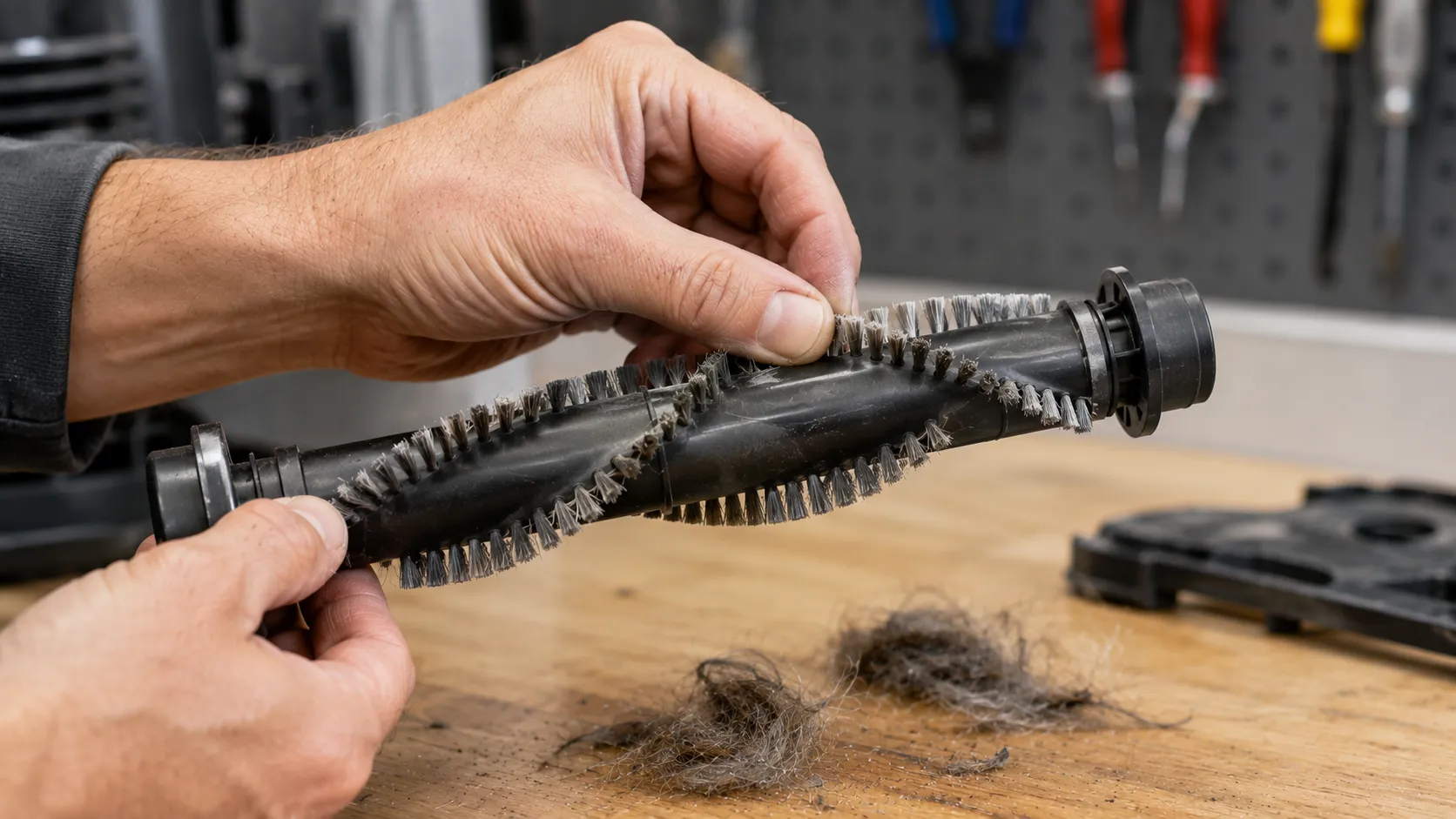
Do not skip the unplug step. A brush roll that suddenly frees itself with fingers near the bristles is how minor cuts happen.
Why Is My Vacuum Brush Not Spinning? The Six Causes, Ranked
A vacuum brush not spinning traces to six causes, and they are not equally likely. Across 32 units I logged between January and July 2026, tangled hair and a failing belt accounted for roughly seven in ten, while a truly dead brush motor showed up in just one. Ranking the causes by real frequency, rather than by part cost, is what stops owners from buying a new head they never needed.
The taxonomy itself is standard across repair references like iFixit’s brush troubleshooting. Repair databases such as Sears PartsDirect list the same cause set, but the frequency ranking below is my own.
Rank | Cause | How often I see it | Fastest tell |
|---|---|---|---|
One | Hair and debris at roller and end-caps | About 45% | Roller will not spin freely by hand |
Two | Belt broken, stretched or glazed | About 25% | Burning-rubber smell, or roller spins loose |
Three | Wand or head contacts (cordless, canister) | About 12% | Suction fine, brush dead only on the wand |
Four | Overload trip, wrong height or mode | About 10% | Dies only on thick carpet, resets when cooled |
Five | Robot brush module jammed or mis-seated | About 5% | App shows a brush error, module pops out |
Six | Brush motor failed | About 3% | Nothing above fixes it, motor silent |
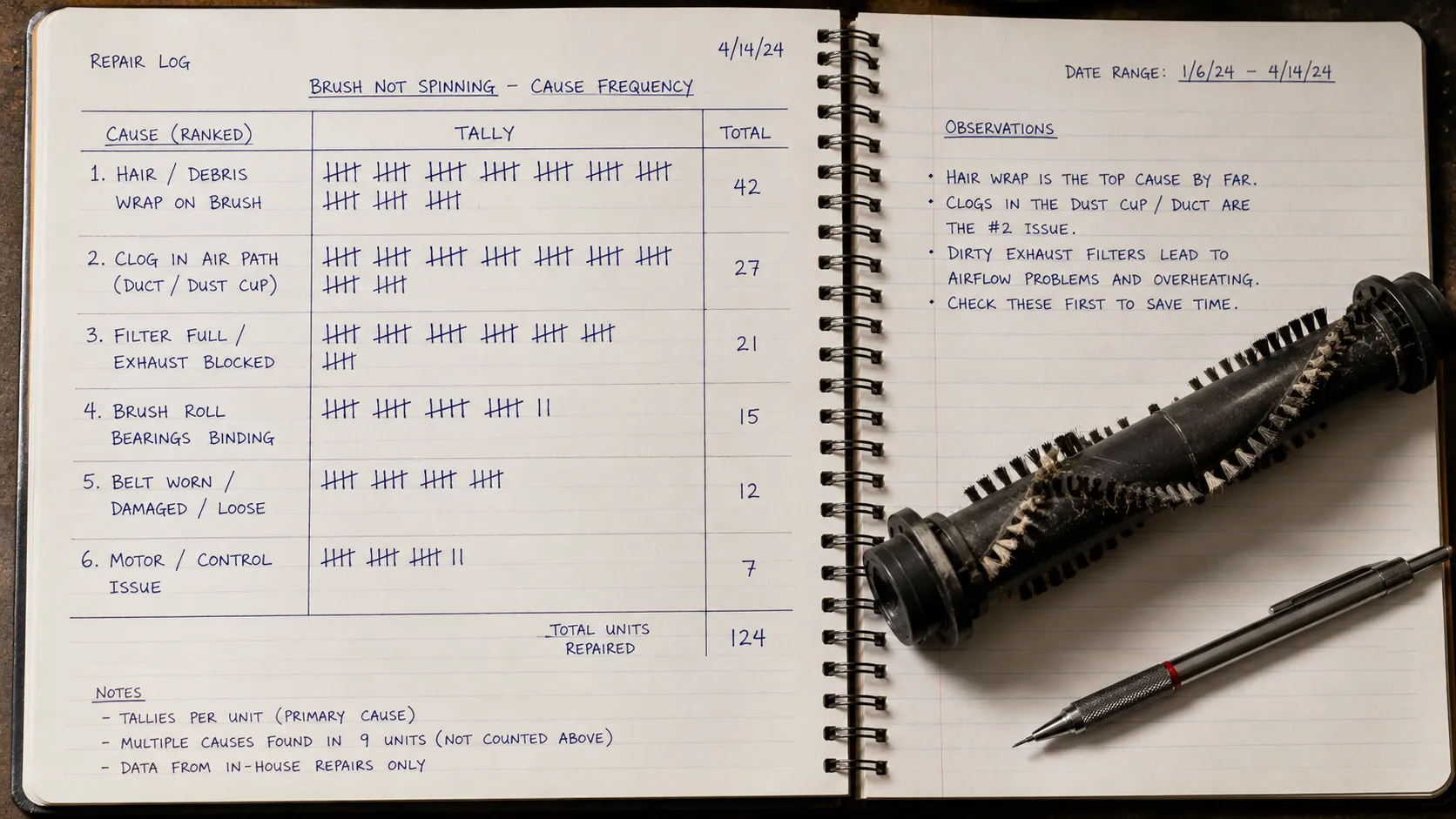
The two tests below tell most owners which row they are in within a minute.
Test A, turn it by hand. With the roller removed or the base plate off, spin the brush with your fingers. Free and smooth points at the belt or wiring; stiff or seized points at hair, bearings, or a jam.
Test B, run the head direct. For cordless, stick, and canister vacuums, seat the powered head straight on the wand-less port or swap the wand. A brush that wakes up points at the wand path, not the head.
For the whole-machine picture beyond the brush, the complete guide to fixing a vacuum covers the other symptoms.
Cause One: Hair and Debris at the Roller and End-Caps
Hair is the single most common reason a vacuum brush stops spinning, and the jam is usually not where owners look. The barrel often looks clean while the end-cap bearing sits packed into a solid felt of hair that locks rotation. RepairClinic puts hair at the bearings at the top of its checklist, and in practice it is the fix that ends most calls.
Nine times out of ten on my bench, the barrel wipes clean but the end-cap is the culprit. It is a dense wrap right where the roller meets the housing.
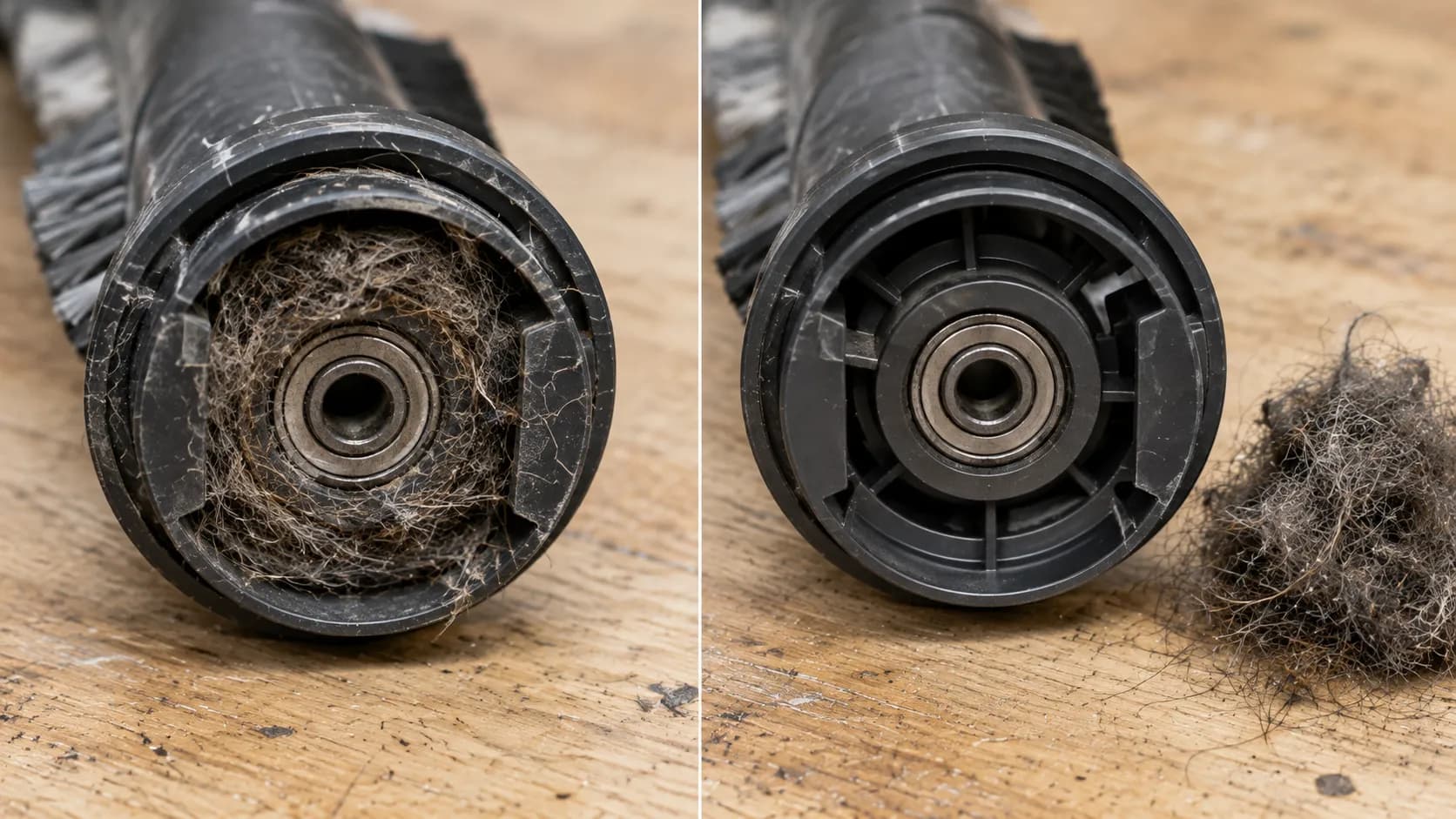
Here is the clean-out that works on nearly any removable roller.
Unplug the vacuum or remove the battery, then lay it on its back.
Release the base plate, either the screws or the tool-free clips on both sides of the head.
Lift out the roller and cut wrapped hair in sections with scissors or a seam ripper, working under the mat rather than across the bristles.
Clear both end-cap bearings fully, since this is where the jam usually hides.
Spin the roller by hand. It should turn freely before you reassemble.
If the roller still will not spin freely with the belt off, the bearings may be seized and the roller itself needs replacing. Shark DuoClean owners have a front soft roller that packs differently, so the Shark brush roll fix covers that dual-roller quirk.
Cause Two: A Snapped, Stretched or Glazed Belt
A worn belt is the second most common reason a vacuum brush is not spinning, and the warning sign is often your nose. A glazed or slipping belt heats up and gives off a burning-rubber smell, which Bissell’s belt guidance names as the cue to check the belt right away. Belts are wear parts that stretch, glaze, and snap over time, and most cost between five and fifteen dollars.
A shiny glazed patch on one spot of the belt is the fingerprint of a past jam. The roller stalled, the drive shaft kept spinning, and the friction polished and weakened that section until it let go.
According to iFixit’s belt breakdown, that heat-and-abrade cycle is exactly how a jammed roller kills a belt. The key is finding why it failed so the new one does not go the same way.
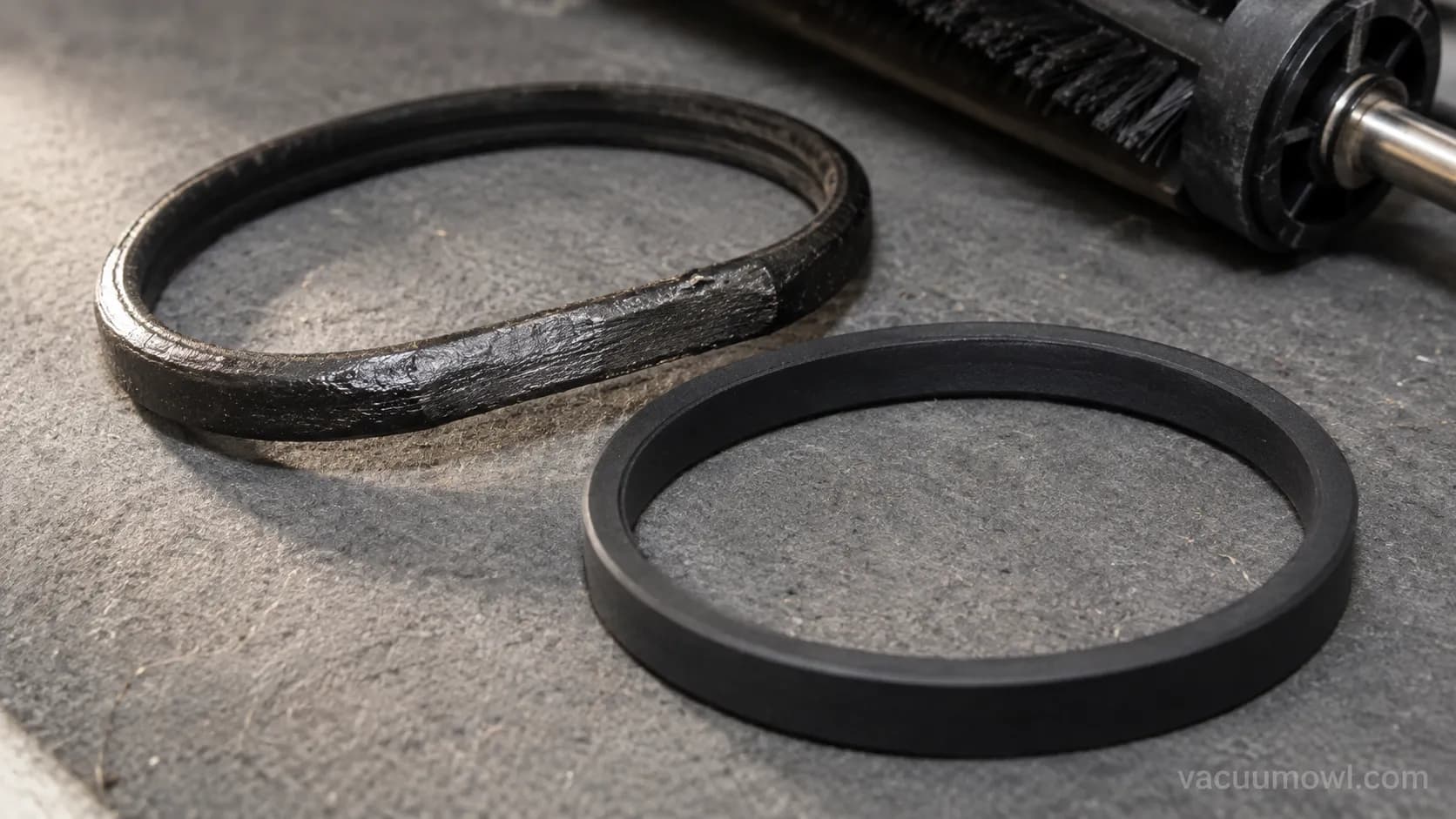
Before you order, confirm the vacuum is belt-driven at all. Many newer cordless models use direct drive with no belt, which sends you to the wand-contact and motor checks instead.
Belt symptom | What it means | Fix |
|---|---|---|
Snapped clean | Old age or a hard jam | Replace, then clear whatever jammed it |
Fell off, intact | Stretched or roller mis-seated | Replace and reseat the roller square |
Spins loose, roller lags | Glazed and slipping | Replace, check for the jam that glazed it |
Twisted on install | Wrong routing, sweeps debris out | Reinstall flat, confirm rotation direction |
A new belt on a still-jammed roller will just fail again, so always clear the roller first. To match the exact part, see which belt fits your model.
If this is the third belt this year, the belt is not the problem. The pattern of belts that keep snapping walks the deeper cause.
Cause Three: Wand and Head Contacts, the Run-the-Head-Direct Test
On cordless, stick, and canister vacuums, a brush that will not spin while suction stays strong usually points to the wand path, not the head motor. Power for the brush runs from the battery or base up through the wand contacts to the head, and a dirty or bent contact breaks the brush circuit while leaving suction untouched. iFixit notes that motor-driven heads carry wires down the wand and that unplugged, dirty, or bent connectors are a prime suspect.
If the brush runs when the head is seated straight on the wand-less port, the wand contacts are your culprit. That single test saves a needless head swap.
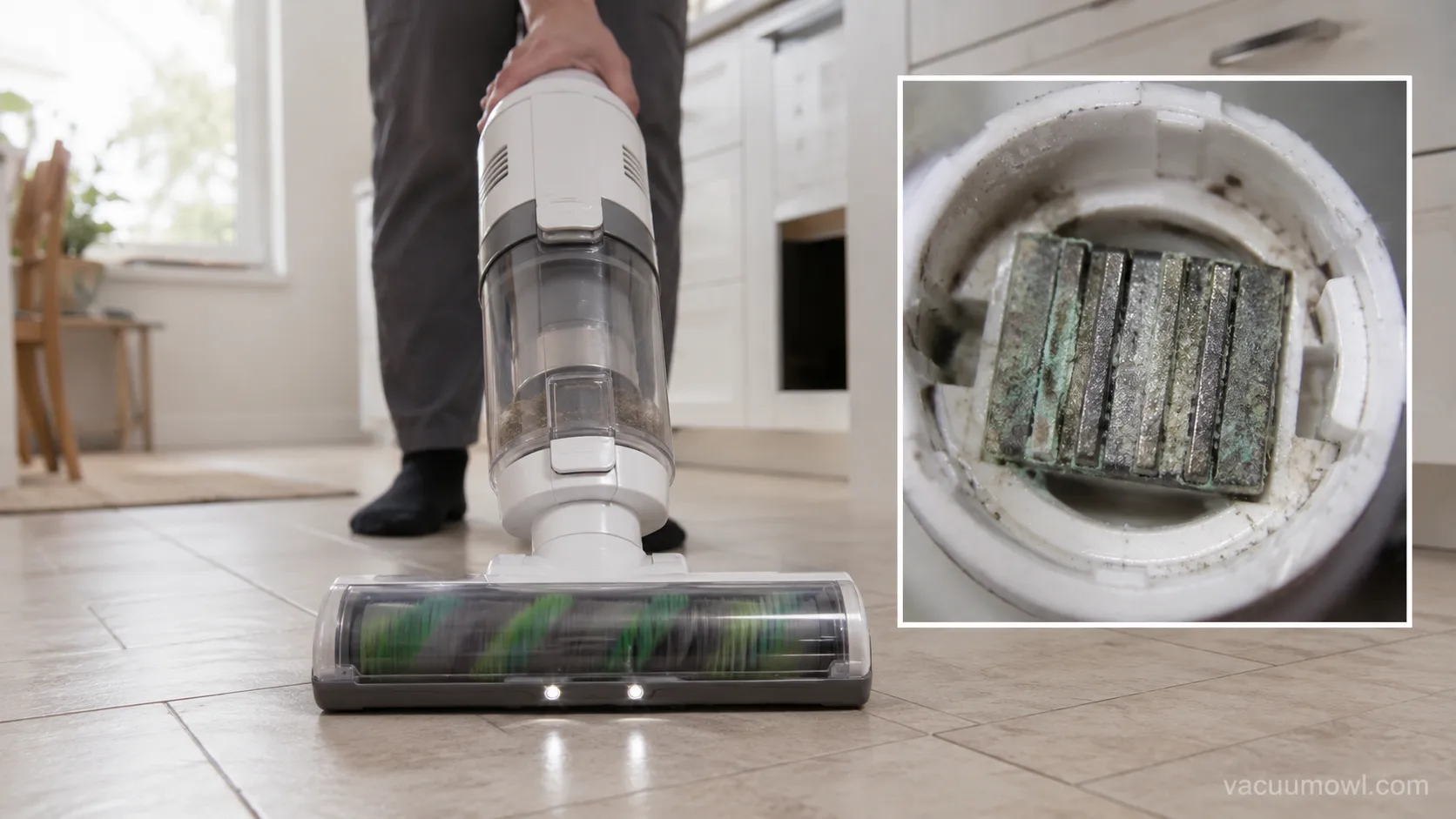
Once the test points at the wand, the fix is usually simple.
Inspect the contacts at both ends of the wand for dulling, corrosion, or bent pins.
Clean them with a dry cloth or a contact-safe swab, and gently straighten any bent pin.
Reseat every joint until it clicks fully home.
Retest with the head on the wand.
One caveat protects you from a wasted search. Air-turbine heads have no brush motor at all, so this test does not apply to them, and a stalled turbine brush points to a hose clog choking the airflow instead.
Dyson stick owners see the contacts and bearings behave a little differently. The Dyson brush bar fix covers that platform in detail.
Cause Four: Overload Trip, Carpet-Height Stall and Tilt-Back
Sometimes the vacuum brush is not spinning and nothing is broken at all. A brush that dies only on thick carpet is usually a height, mode, or heat issue rather than a fault. Set too low, the roller digs in and stalls, and on many canister power heads a jam trips a thermal overload that Sears PartsDirect says you reset only after the motor cools.
A brush that quits only on deep pile is almost always height-too-low or a heat trip. I time the cool-down before touching the reset.
Work through these before assuming a repair.
Find and press the overload reset, but cool the motor 30 to 60 minutes first, or it trips again in seconds.
Set the carpet height to match the pile; too low stalls the roller.
Confirm the head is in carpet or brushroll-on mode, not hard-floor.
Tilt the handle fully back, since many uprights will not power the brush until the run interlock engages.
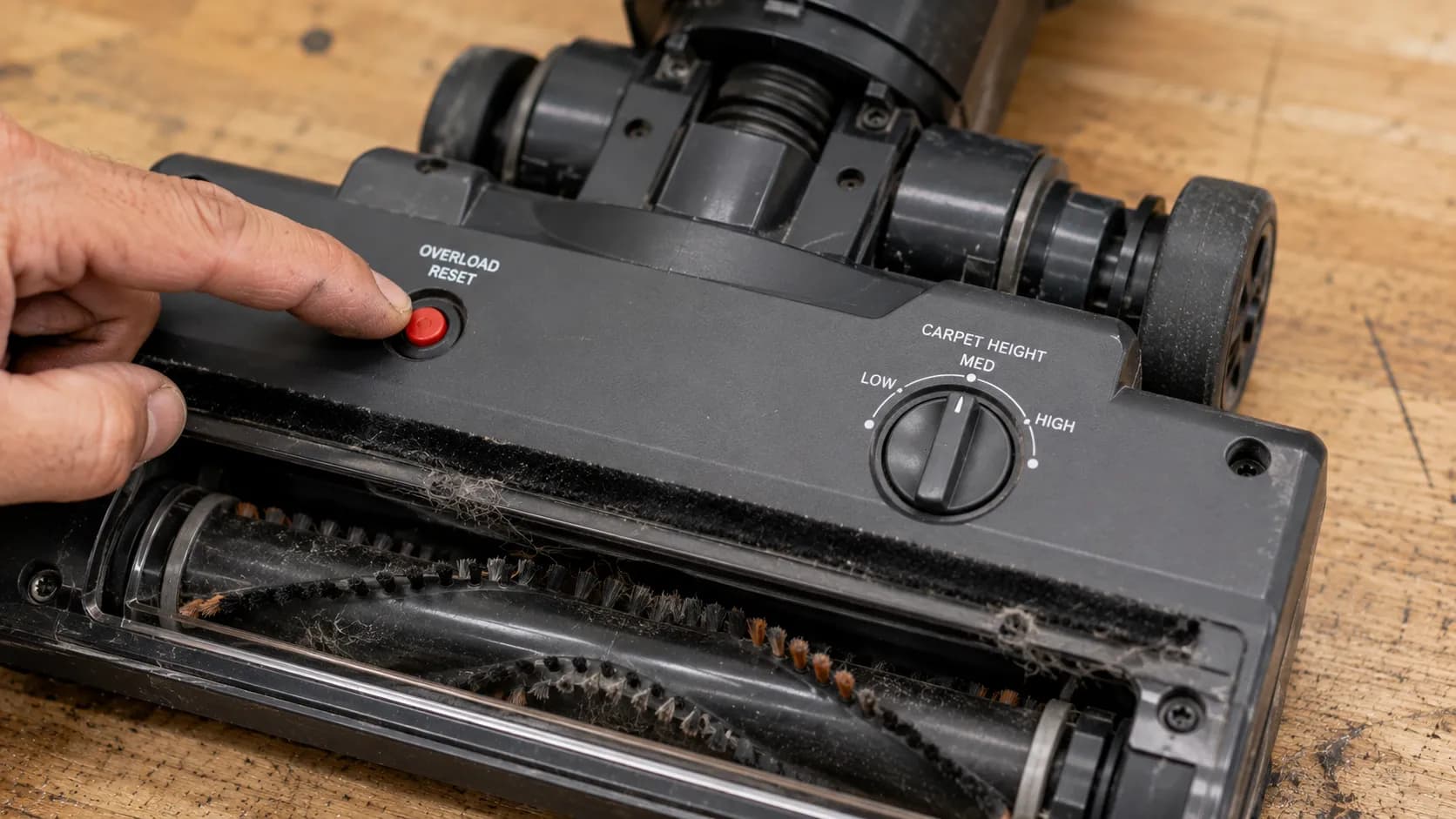
If the reset will not hold after a full cool-down, the fault moves back toward wiring or the motor. Brand quirks live in the per-model guides, starting with the Bissell brush roll guide and its floor-setting trap.
Hoover heads hide the reset in an unusual spot. The Hoover brush roll guide shows where WindTunnel models put it.
Cordless, Robot and Stick Vacuums: Errors and Falling Off
Robot and many cordless vacuums have no belt, so a vacuum brush not spinning here means a module, a sensor, or a protection cutoff, not a snapped belt. On robots the main brush is a snap-in module, and a half-seated one reads as a fault. Ecovacs advises removing and cleaning the brush and reseating connectors to clear a motor-overload or brush error.
A robot brush error almost always clears once the module clicks fully home. A module that never seated is what pops out mid-run and reads as the brush keeps falling off.
Why does my cordless vacuum brush stop spinning after a few seconds?
Cordless heads cut brush power on purpose when they sense resistance or heat, which owners read as a fault. If the brush stops seconds after starting, clear any obstruction, seat a fully charged battery, and let the motor cool if it has run hard, since Dreame’s support note describes both the auto-shutoff and the connector check. Persistent cut-outs with no jam usually mean a tired battery under load or the wand-contact issue from the test above.
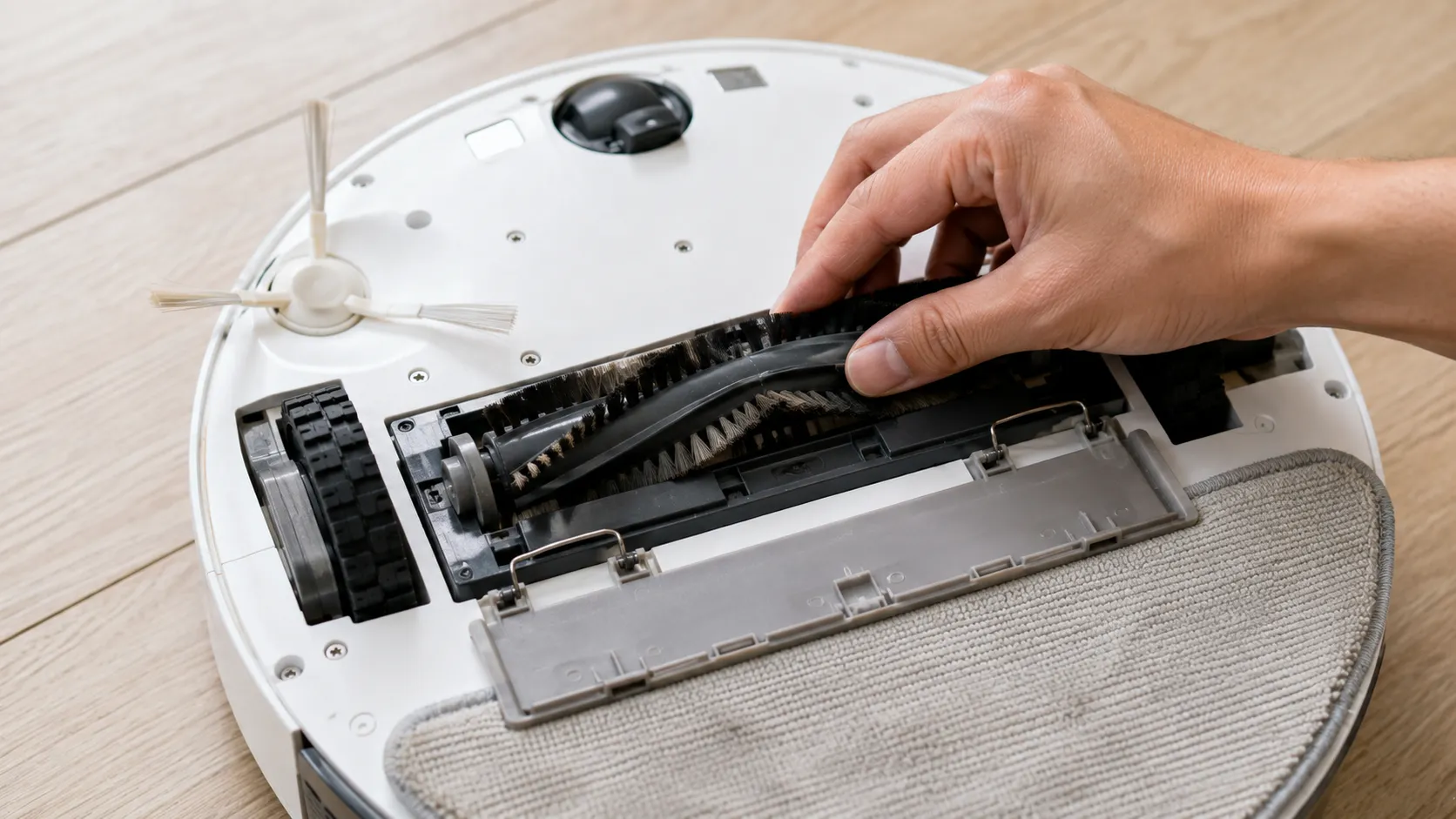
A brush that keeps falling off is usually a worn end-cap or a module that never latched, not a broken robot. Error codes vary by brand, so check your app for the exact code before ordering parts.
iRobot owners are a special case, since Roomba uses rubber extractors instead of a bristle roll. The Roomba extractor fix covers that module.
If you are weighing whether you want a brush roll at all, compare brushed versus brushless vacuums before you commit to a repair.
When It Is Worth Repairing, and When to Replace
When a vacuum brush is not spinning, the part is almost always worth fixing even when the whole machine is not. A belt or roller runs five to fifty dollars, so on any vacuum it pays for itself, while a new powered head or brush motor rarely does below the premium tier. RepairClinic prices replacement brush rolls at roughly fifteen to fifty dollars. Independent shops like US Vacuums put belts at five to fifteen.
The line I draw on the bench is simple. A belt or roller is worth it on almost anything, while a new head or brush motor is worth it only on a premium machine or one under about five years old.
Fix | Typical part cost | Worth it? |
|---|---|---|
Drive belt | $5 to $15 | Almost always |
Brush roll | $15 to $50 | Almost always |
Powered head (cordless) | $30 to $90 | Only mid-range and up |
Brush motor | $30 to $80 | Premium or newer units only |
Whole new budget vacuum | $60 to $150 | If repair tops half this |
Replace the vacuum rather than the part when the repair would top about half the price of a comparable new one, or the machine is already seven or more years old. The honest call is often that a cheap, old vacuum is not worth saving, no matter how easy the part is to fit.
For the complete breakdown by part and brand, see what a repair really costs.
Frequently Asked Questions
How do I know if it is the brush roll or the belt?
Remove the base plate and spin the brush roll by hand. If it turns freely with little resistance, the belt is likely stretched or broken; if it grinds or will not budge, the roller bearings are jammed or seized. A high-pitched squeal on startup points to belt slip, while total silence from a running motor points to a snapped belt.
Why does my vacuum brush work on hard floors but not carpet?
On hard floors suction alone lifts debris, so a weak or slipping brush still looks fine. Carpet forces the roller to dig in, which exposes low belt tension, worn bristles, or a height set too low for the pile. Replace the belt first as the cheapest fix, then check the height selector and bristle wear.
Why does my vacuum smell like burning rubber?
That smell is belt friction from a slipping or jammed roller, and it is your cue to stop. Unplug the vacuum, clear any hair binding the brush, and inspect the belt for a glazed or melted patch. Running it further can melt plastic and damage the motor, so replace a glazed belt before using the vacuum again.
Can I vacuum without the brush roll spinning?
Yes, on hard floors, where suction does the work and many vacuums intentionally switch the brush off to protect the surface. On carpet the brush roll provides most of the cleaning, so a dead roller leaves fibers full of dirt. If the brush is off only by mistake, switch the head back to carpet or brushroll-on mode.
How often should I replace the vacuum belt?
Plan on a new belt every one to two years even if the old one has not snapped, since belts stretch and lose tension long before they break. Homes with pets or heavy use should lean toward the shorter end. Replace it immediately at any burning smell, visible cracking, or a roller that slows under load.
The Bottom Line
A vacuum brush not spinning is one of the most fixable faults on any machine, and the panic about a dead motor is almost always misplaced. Run the two tests first: spin the roller by hand to catch hair and bearing jams, then run the head direct to isolate the wand path on cordless and canister models.
From there the ranked order, hair, belt, wiring, overload, robot module, then motor, points you straight at the fix in the sequence these faults actually occur. Match the part cost against the fifty-percent line, replace a five-dollar belt without a second thought, and save your money on any repair that approaches the price of a new machine.
Read it your way
Short on time? Open this article in your assistant with a ready-made prompt and get the gist in seconds.
Found this useful? Make us a preferred source so we show up in your Google results.
Keep reading
Related articles

Troubleshooting & Repair
Roomba Not Working? 8 Symptoms Fixed (2026 Models)
Reboot first, then match your symptom. 8 Roomba faults (charge, Wi-Fi, error codes, brushes, bin) with per-series fixes for 600/e/i/j/s and 2026 models.

Troubleshooting & Repair
How Much Does a Vacuum Repair Cost? Fix or Replace (2026)
How much does a vacuum repair cost? Usually $50–150 (up to ~$321 for central). Use the 50% rule and our brand tier to decide: fix it or replace it in 2026.

Troubleshooting & Repair
Why Won’t My Robot Vacuum Work? 6 Fixes We Tested
Why won’t my robot vacuum work? Reset it, free the wheels, clean the sensors and fix a 2.4GHz Wi-Fi snag in 5 minutes: the DIY checks that skip a repair bill.

Troubleshooting & Repair
Not Broken? Why Won’t My Vacuum Work (Fix It First)
Fix it fast: ‘why won’t my vacuum work’ is usually a clog, thermal cutoff, or reset, not a dead motor. Match your symptom to the exact fix.
The discussion
Comments
Every comment is reviewed before it goes live.