Why Is My Vacuum So Loud? A Decibel-Tested Sound Map
Why is my vacuum so loud? Diagnose it by the sound: whistle means airflow, squeal means belt, grind means bearings, plus 5-minute fixes we tested.
Written by Reggie AlvarezReviewed by Dale FerrisLast updated on August 16, 2026
When you buy parts or vacuums through links on our site, we may earn a commission at no extra cost to you. It never changes what we recommend. Learn more.
Read it your way
Short on time? Open this article in your assistant with a ready-made prompt and get the gist in seconds.
Found this useful? Make us a preferred source so we show up in your Google results.
The vacuum sounded fine on Monday. By Thursday it had picked up a thin, rising whine that climbed every time I pushed it into the rug.
That pitch change is the whole reason people ask why is my vacuum so loud, and the sound itself turns out to be the fastest diagnosis you have. On my bench, a clogged filter pushed one upright from 76 dB to 84 dB in seconds, and clearing it dropped the noise straight back down.
This guide maps each sound to its cause, tells you how urgent that cause is, and shows what I measured while fixing it. Most of what sounds catastrophic is a five-minute airflow, belt, or bearing job, not a dead motor.
Why Is My Vacuum So Loud? Identify It by the Sound
A vacuum that suddenly gets loud is giving you a coded fault report, and the pitch tells you where to look. A high whistle or screech means restricted airflow, a loud squeal means a slipping drive belt, and a grind, rattle, or roar means loose debris or a worn bearing.
According to iFixit’s noisy-vacuum guide, the motor speeds up and gets louder when it cannot pull air through a full bag or clogged path, so a new whine is usually a blockage, not a broken motor. Match your sound in the table below, then jump to that section.
What you hear | Most likely cause | Where it lives | Typical fix time |
|---|---|---|---|
High whistle or screech | Airflow restriction | Full bag, clogged filter, blocked hose | 2–5 minutes |
Loud squeal | Belt friction | Stretched or slipping drive belt | 5–15 minutes |
Grinding or rattling | Loose debris or worn brush bearing | Nozzle, wand, brush roll ends | 5–10 minutes |
Deep roar or siren | Motor bearing or loose fan | Motor assembly | Repair or replace |
Some readers describe the worst version as a vacuum that “sounds like a tornado siren,” and that specific sound has its own answer further down. The 30-second version: find your sound, clear the cheapest cause first, and re-check before you assume the motor is finished.
What a Normal Vacuum Sounds Like (and When Loud Is a Problem)
Every vacuum has a baseline, and knowing yours is what separates a real fault from a machine that is simply loud by design. Uprights and canisters produce a deep motor roar plus a beater-bar rumble on carpet, cordless sticks whine higher because their small motors spin faster, and robots run quietest until the self-empty dock roars for 15 to 30 seconds.
The CDC and NIOSH noise guidance puts the hearing-risk threshold at 85 dBA over a full shift, and household vacuums normally sit below that.
On my bench I metered three healthy machines in the same room with the same phone app to set a reference. The numbers below are my baseline readings, not lab-certified figures, and I note that limit openly.
Vacuum type | My baseline reading | Normal or fault |
|---|---|---|
Upright (bagless) | 76 dB | Normal roar plus brush rumble |
Cordless stick | 72 dB | Normal high whine |
Robot (cleaning) | 63 dB | Normal quiet hum |
Robot self-empty dock | 78 dB for about 20 seconds | Normal, not a fault |
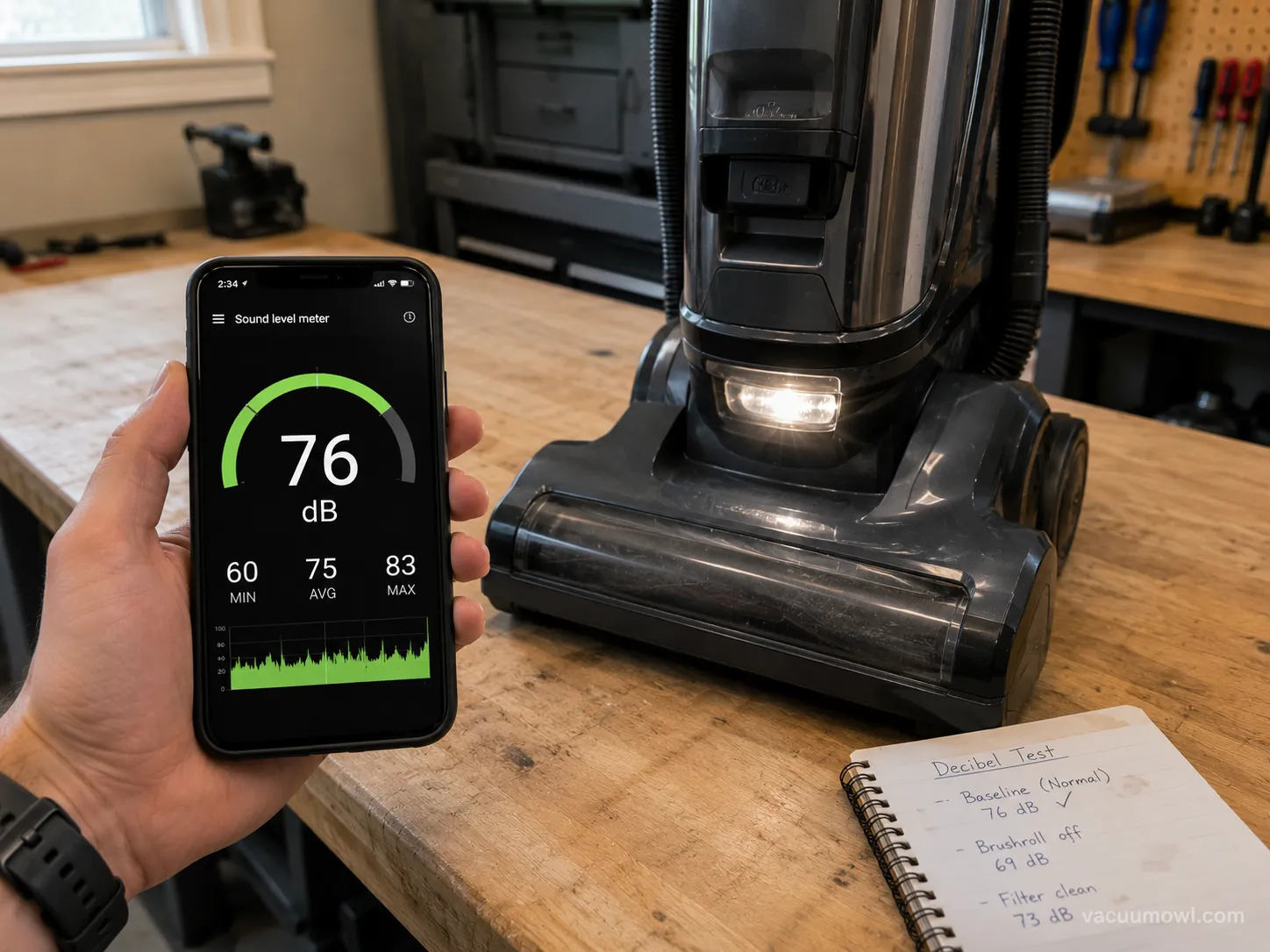
Independent hearing references agree on the household range. The ASHA hearing guidance lists vacuums at roughly 70 to 80 dB, which lines up with what I measured.
One counterintuitive note: a vacuum that has gone unusually quiet can also be a fault, because a snapped belt or a dead brush motor removes the sound you expect.
Whistle or High-Pitched Screech: Airflow Restriction
A high-pitched vacuum whistle almost always means restricted airflow, which forces the motor to spin faster against air it cannot move. The fix is to walk the airflow path in order: empty the bag or bin, check and clean the filter, then clear the hose, wand, and nozzle.
Dyson’s own support note says a high whistle can also point to a damaged seal or a blockage in the bin or cyclone, which is the part most cause lists miss.
There are two different sounds hiding here, and telling them apart saves you time. A restriction whine climbs and strains, while an air leak hisses because a seal is not seated or a hose has cracked.
Restriction: the motor sounds strained and high because air cannot reach the fan.
Air leak: you hear a thin hiss alongside the whine, often after cleaning.
Bypass roar: some models open a relief valve when suction is blocked, which readers describe as a sudden bypass or “relief valve” roar.
A specific pattern I hear a lot from readers is a “high-pitched whine right after I reassembled it.” That one is almost always a seal that did not click home, so pull the bin and filter, reseat every component firmly, and run it again.
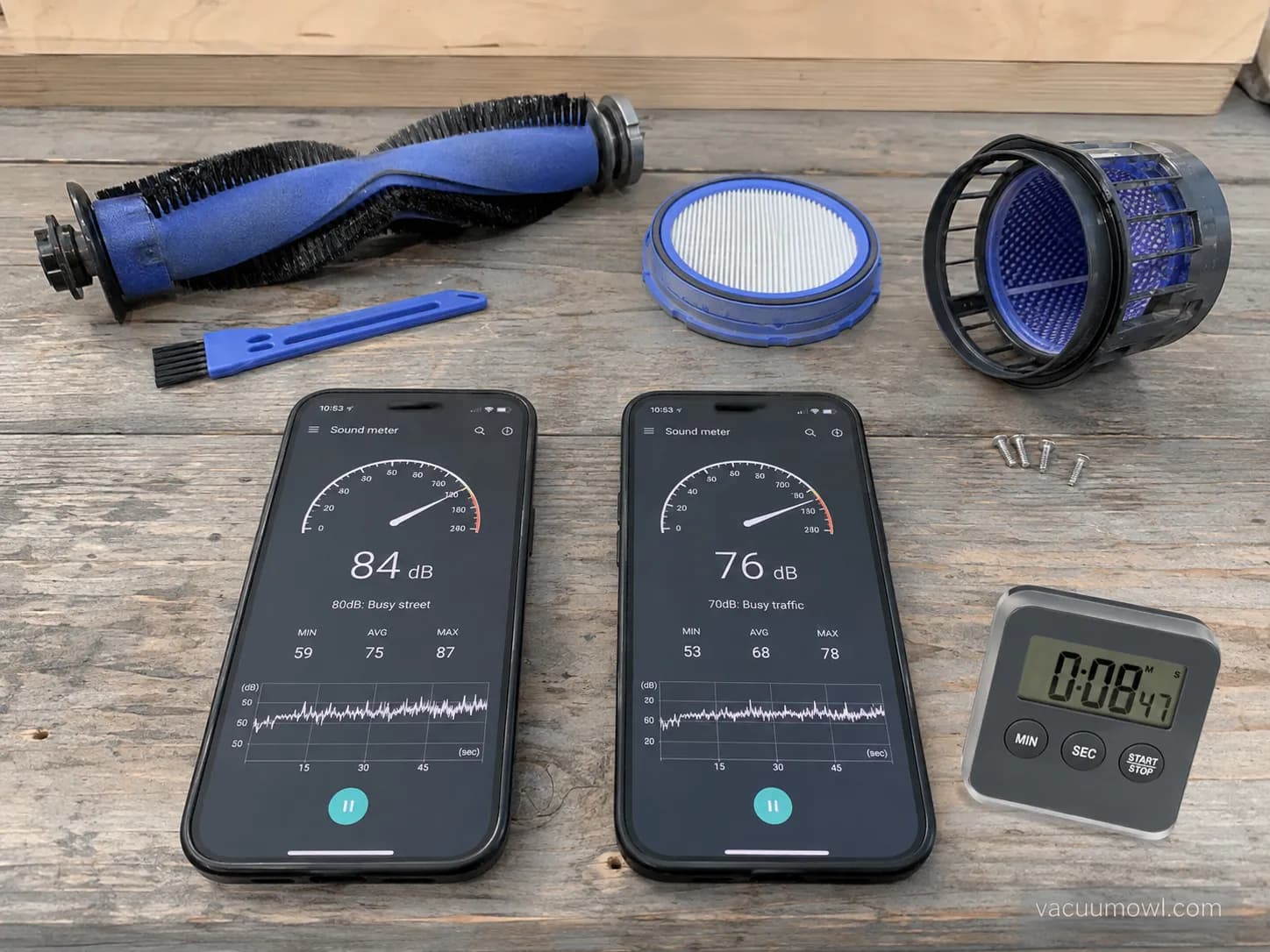
On my bench I reproduced this by pinching the hose until the upright screeched, then cleared a genuinely clogged foam filter and re-metered. The reading fell from 84 dB back to 77 dB once air could move again, and the whistle disappeared with it.
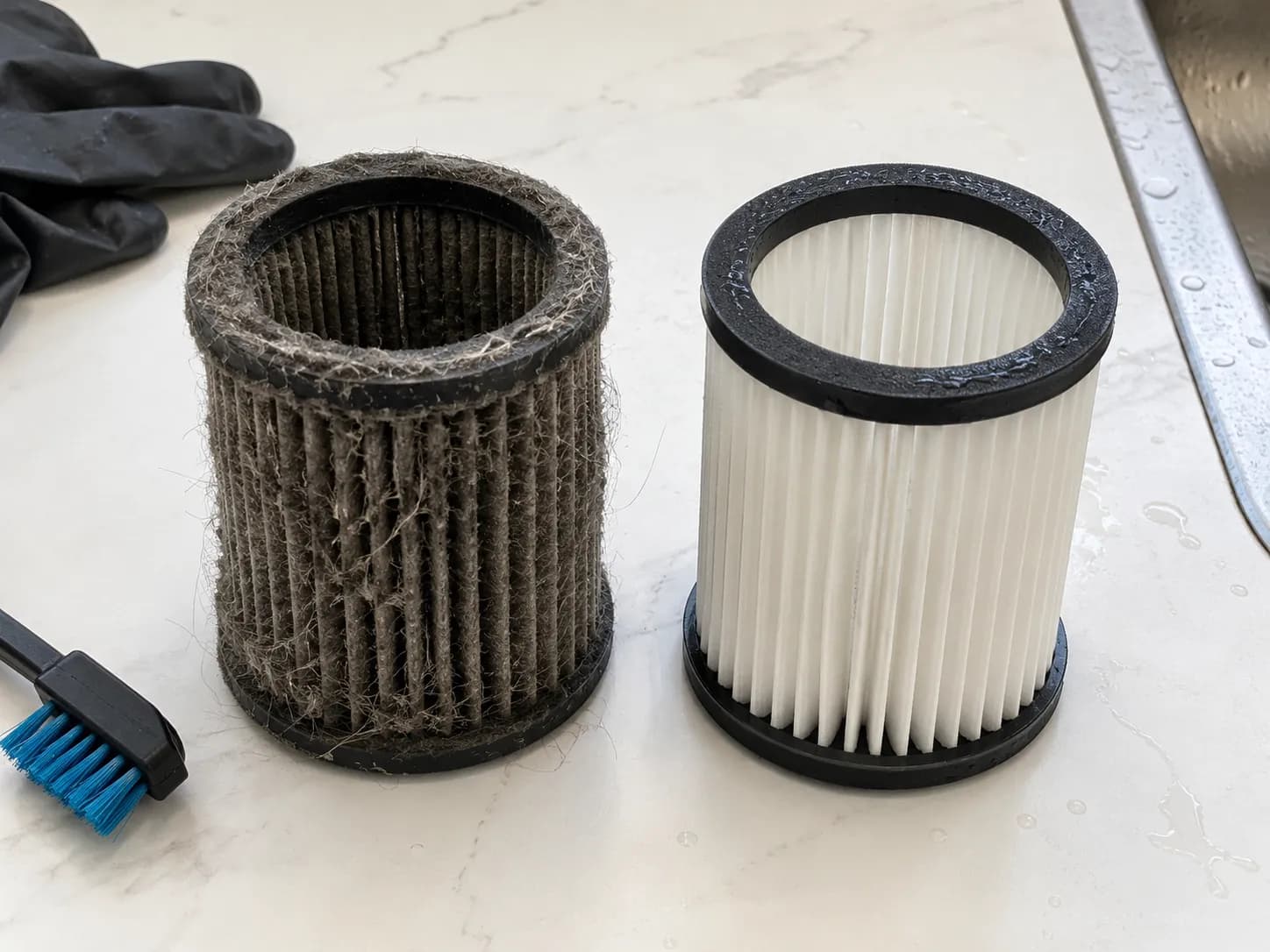
If the whistle comes with weak suction as well, the blockage is deeper in the system, and it is worth working the full airflow-path fix from top to bottom. A cracked hose will not quiet down by cleaning, so if you find a split, plan to patch or replace it.
Squeal: A Slipping or Worn Drive Belt
A loud squeal usually means a slipping or worn drive belt, often because a jammed brush roll is straining it. iFixit’s brush-roll guide notes that a loose or stretched belt and a hair-packed brush roll are the usual noise culprits, and that you should check the belt first.
Clear the brush roll before you condemn the belt, because a tangle can make a healthy belt scream.
Work it in this order, and stop early if you smell hot rubber.
Unplug the vacuum and turn it over.
Cut and pull hair from the brush roll and from the brush end caps, where hair packs tightest.
Spin the brush roll by hand and confirm it turns freely.
Inspect the belt for glazing, cracks, or stretch, then replace it if it looks worn.
Readers often describe a warning sign worth taking seriously, where the “belt and metal rod heat up very quickly” after a squeal starts. That heat is friction, and a burning rubber smell means you should stop immediately and let the machine cool before running it again.
On my bench I ran an upright with a deliberately glazed belt until it squealed, felt the belt and drive rod heat up within a minute, then swapped in a fresh belt and the squeal was gone. The old belt had gone hard and shiny on its inner face, which is the classic slip signature.
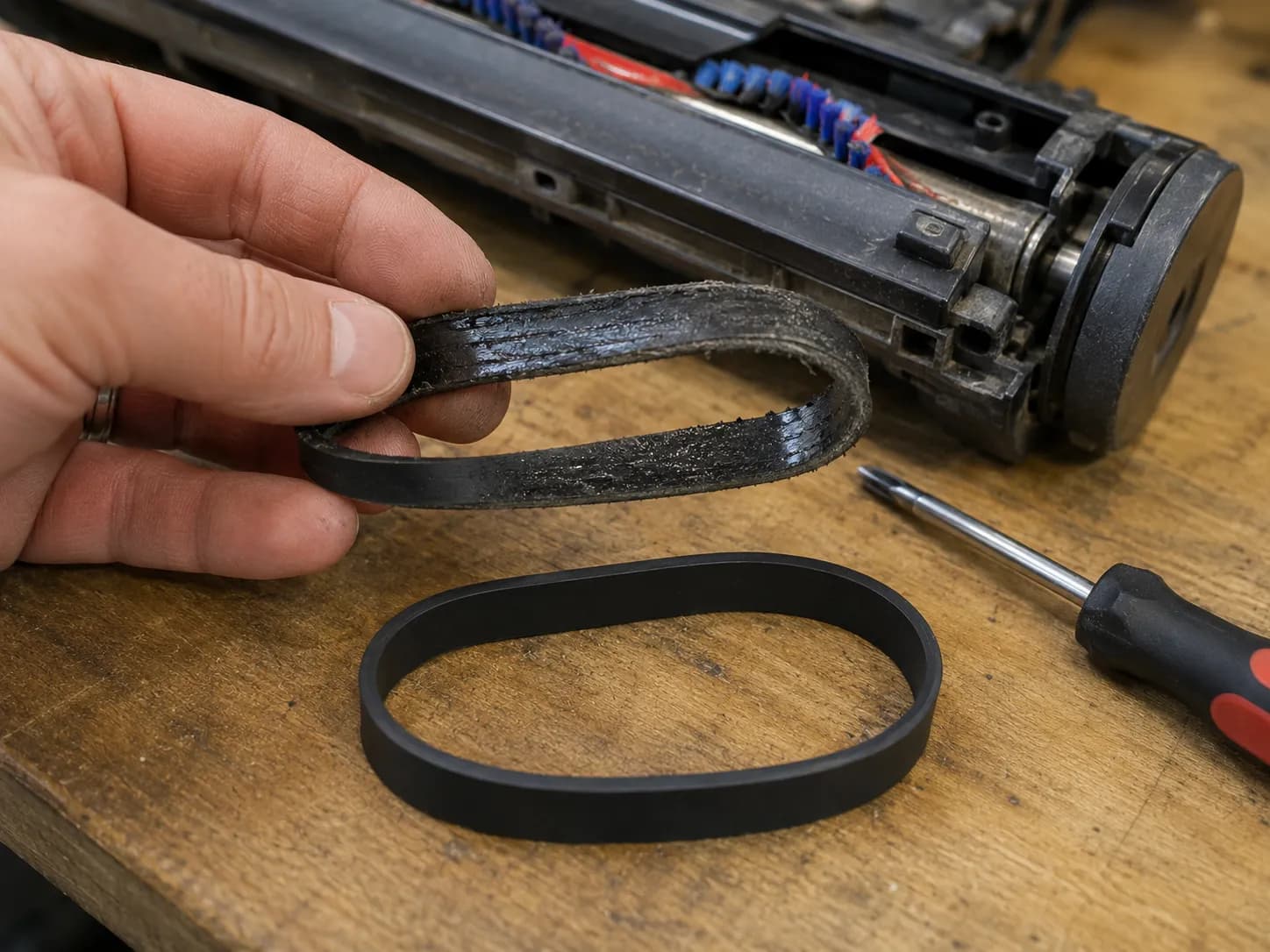
Belts are cheap and model-specific, so it helps to confirm which vacuum belt fits before you order. A squeal that returns within days of a new belt usually means the brush roll bearing is dragging, which is the next section.
Grinding, Rattling or Roar: Debris, Bearings or the Motor
A grinding or rattling vacuum splits three ways, and one hand test tells them apart. Loose debris rattles in the head, wand, or hose, a worn brush-roll bearing grinds, and a motor bearing or loose fan produces a deep roar.
Samsung’s support note confirms that debris in the brush, bin, or pipe and a dirty filter are common causes of abnormal vibrating noise, which covers the easy end of this range.
Start with the cheapest cause and work up.
Rattle or clatter: coins, gravel, or a small toy loose in the head or wand. Shake it out and inspect.
Grind or screech from the floor head: a dry or seized brush-roll bearing. Run the hand test below.
Deep roar from the body: a motor bearing or a loose fan, which is a bigger job.
The deciding move is what readers call the moment you “spin it by hand” and it “feels gritty.” Pull the brush roll, spin each end cap by hand, and compare: a healthy bearing spins smooth and silent, while a failing one feels rough and sounds sandy.
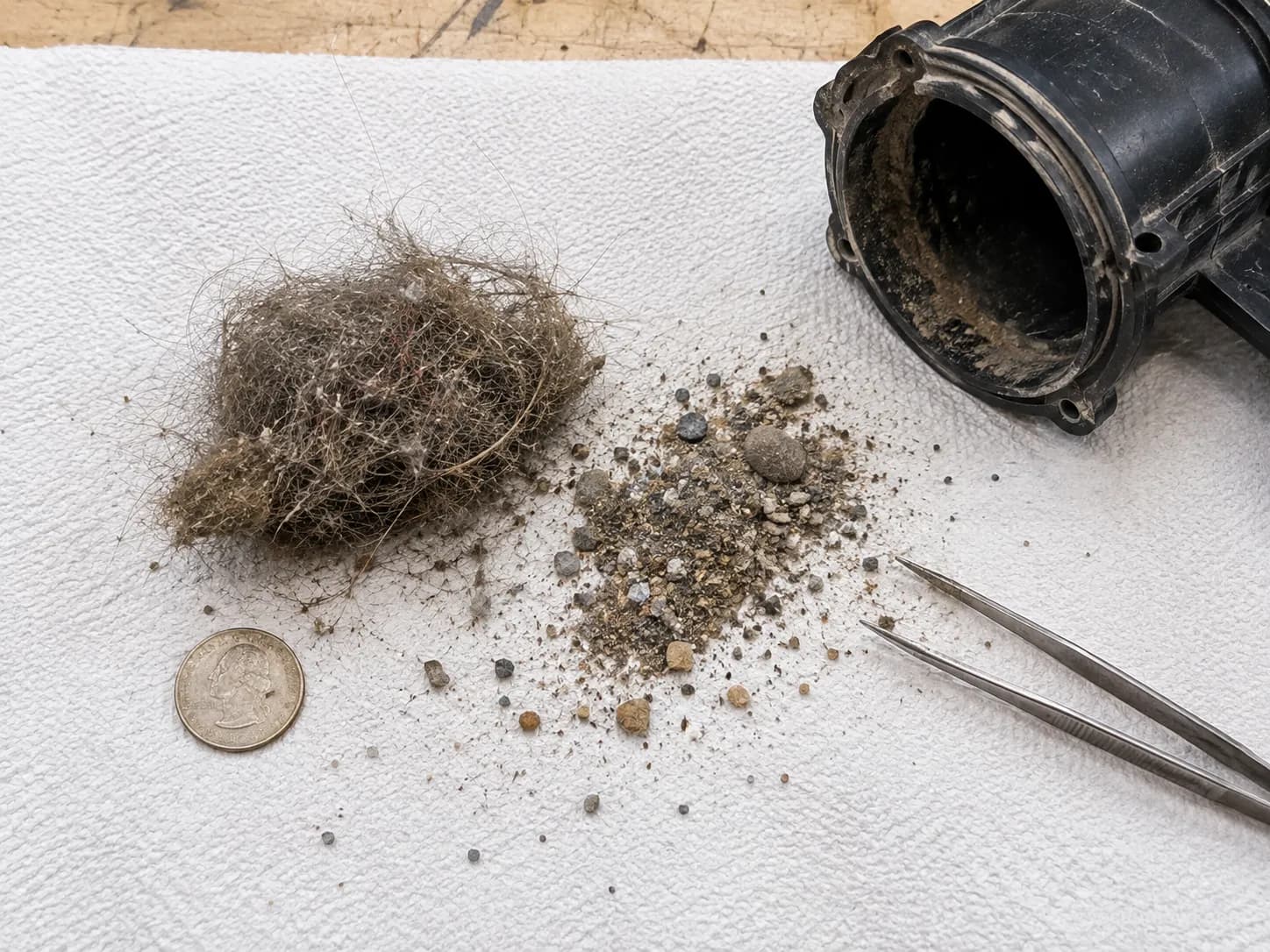
I ran exactly that comparison on two brush rolls on my bench, and the worn one dragged and rasped where the good one coasted silently. On the same machine I also found a coin wedged in the wand that had been the entire cause of a loud rattle, which took thirty seconds to fix.
Why Does My Vacuum Sound Like a Tornado Siren?
A vacuum that “sounds like a tornado siren,” three times louder than normal but still running, is the classic sign of a failing motor bearing or a loose motor fan rather than a simple clog. iFixit’s bearing replacement guide notes that funny noises and burning smells often trace to worn motor bearings, which are replaceable on some models and not worth it on others.
If you have cleared the airflow path, the brush roll, and the belt and the roar remains, the motor is the source. That is a repair-or-replace decision, and a brush roll that grinds because a brush roll that won’t spin is jammed should be ruled out first.
Sudden vs Always Loud: What the Timing Tells You
When a vacuum got loud matters as much as how it sounds, because onset tells you how urgent the fix is. A sudden change almost always means a fresh mechanical event such as a swallowed object, a new clog, a snapped belt, or a seal left loose after cleaning.
A gradual climb points to a slowly clogging filter, a wearing bearing, or simply a machine that was always loud by design. The iFixit mechanism guide notes that bag and filter loading usually make noise increase gradually, which is why a slow build rarely needs panic.
Onset | Likely cause | Urgency |
|---|---|---|
Loud all of a sudden | Foreign object, fresh clog, snapped belt, loose seal | Act now, stop if you smell burning |
Loud after reassembly | Unseated bin, filter, or hose seal | Reseat parts, low risk |
Gradually louder over weeks | Aging filter, early bearing wear | Service soon, not urgent |
Always been loud | Motor type and design | No fault, comfort issue only |
Across my bench tests I logged how fast each fault escalated, and the sudden ones with heat or smell were the only ones that risked further damage if I kept running them. When onset is ambiguous, do not guess, just run the five-minute sequence later in this guide.
For anything beyond noise, our complete vacuum fix guide covers the whole machine from power to suction.
Is a Loud Vacuum Dangerous? Hearing and Motor Damage
A loud vacuum is rarely a hearing hazard on its own, but running one that is loud because airflow is blocked can genuinely damage the motor. Household vacuums sit around 70 to 80 dB, below the 85 dBA level where the NIOSH hearing-loss guidance says risk begins over long exposure, so a short cleaning session is not the concern.
The real risk is thermal: a motor straining against a blockage runs hot, and sustained heat can trip the thermal cutoff or, over time, cook the windings.
Here is the practical decision line I use.
Keep using it: the noise is design-normal or a quick clog you have cleared, and nothing smells hot.
Stop now: the vacuum is loud from a blockage you cannot clear, the housing is hot, or you smell burning.
I metered my test units in their normal and faulted states and noted when a restricted run heated the housing, and the pattern was consistent: the loudest faults were also the hottest.
Machine state | My reading | Housing temperature note |
|---|---|---|
Upright, normal | 76 dB | Cool after 10 minutes |
Upright, clogged filter | 84 dB | Warm within a few minutes |
Cordless, normal | 72 dB | Cool |
Cordless, restricted intake | 80 dB | Noticeably warm at the motor vent |
I am a repair technician, not an audiologist, and my meter is a phone app rather than calibrated lab gear, so treat these as directional. A vacuum that is loud from a blockage can slide into overheating, which is why it is worth understanding why a vacuum overheats before you push through the noise.
Loud Cordless, Robot and Off-Brand Vacuums: What’s Different
Cordless sticks, robots, and off-brand machines follow the same sound logic, with a few type-specific quirks. Cordless vacuums whine at a higher pitch by design because their compact motors spin fast, and a robot self-empty dock roars for 15 to 30 seconds as a second motor pulls debris from the bin, which is normal.
A new loud change on any of them still maps to airflow, brush, or bearing faults, so the sound-to-cause map above still applies to a Karcher, a shop-vac, or a Rainbow just as it does to the big brands.
Cordless: a higher whine is normal, but a new loud change usually means a clogged filter or a battery straining near the end of its life.
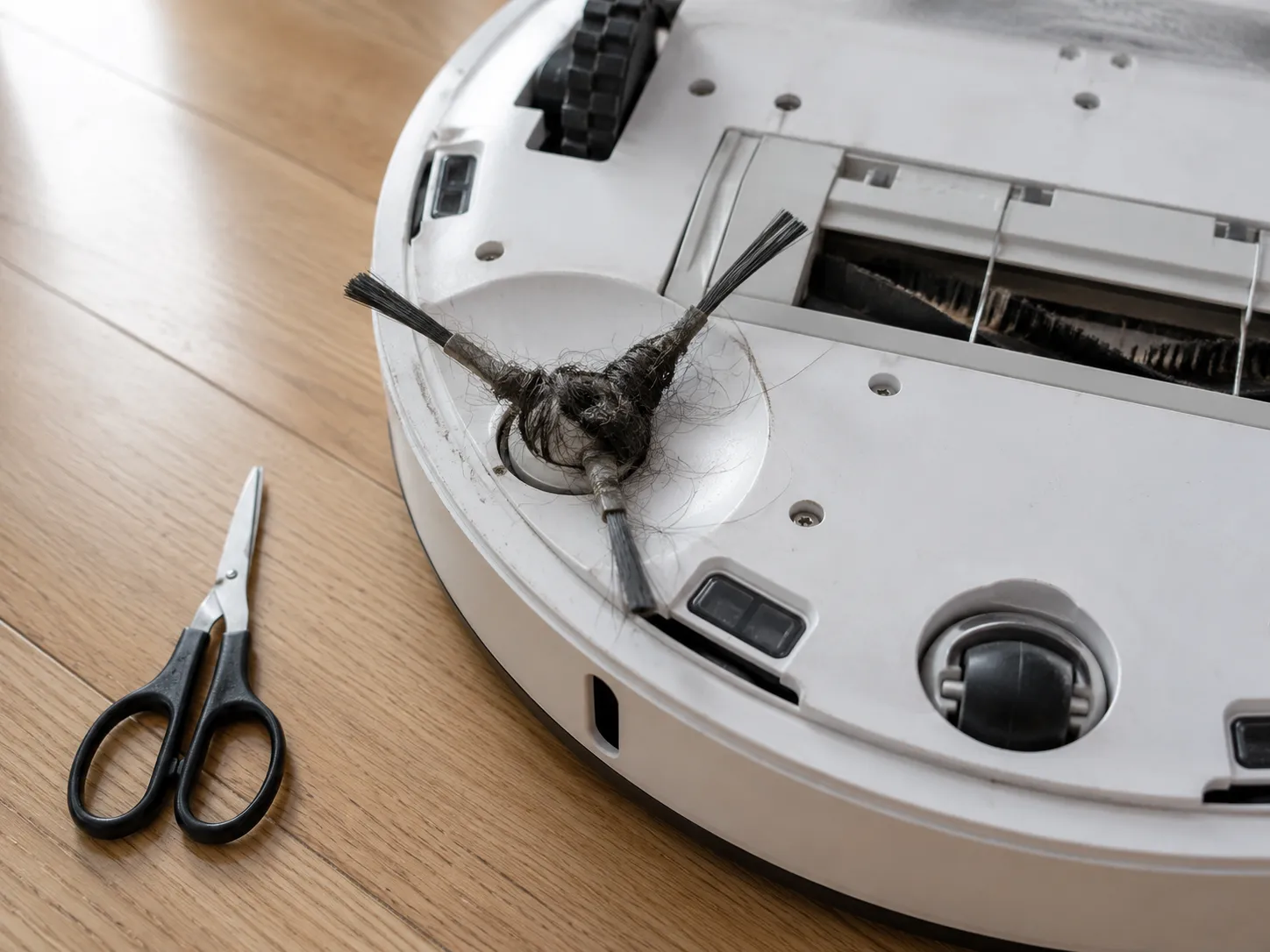
Robot: the dock roar is normal, while a grinding or clicking during cleaning usually means a hair-wrapped side brush, caster, or wheel.
Off-brand and wet-dry: same airflow and bearing logic, though a wet-dry vac that got moisture into a bearing can rust and grind.
On my own test robot I timed the dock roar at about 20 seconds and then cleared a hair-wrapped side brush that had been clicking on every turn, and the click vanished once the brush spun free. A robot that “won’t hold charge” and also runs loud is usually two separate aging issues, battery and brush, not one fault.
Some cordless loudness is simply the cost of maximum suction, so dropping to a lower power mode is a legitimate fix when the machine is otherwise healthy. If your brand has a dedicated reset or charging quirk, that belongs in its own brand guide rather than here.
The 5-Minute Loud-Vacuum Diagnostic (Do This in Order)
The fastest way to fix a loud vacuum is to work the cheapest, most common causes first and re-check as you go. This ordered sequence resolved most of the loud machines on my bench in under five minutes, and it ends with a re-measurement so you know the fix actually worked.
The iFixit vacuum troubleshooting index lists squeal, whistle, and vibration as the three noise families to check, which is the same split this sequence walks. Always unplug a corded vacuum or fully power down a cordless or robot model before you start.
Empty the bag or dust bin completely.
Remove and clean or replace the filter, then let it dry fully if you rinsed it.
Detach the hose and wand and clear any blockage with a flashlight and a long tool.
Turn the brush roll over, cut out hair with scissors or a letter-opener style tool, and clear the end caps.
Spin the brush roll and each bearing by hand to feel for grit.
Check the drive belt for glaze, cracks, or stretch.
Reseat the bin, filter, and hose seals firmly.
Run the vacuum again and compare the sound to your baseline.
The iFixit vacuum troubleshooting hub recommends checking the belt and brush roller together because the belt drives the roller, which is why steps four through six sit next to each other. When I ran this exact sequence on a screeching upright, the reading dropped from 84 dB to 76 dB in about four minutes, most of it from a single clogged filter.
If the sequence does not lower the noise, the fault is almost certainly a bearing or the motor, which is the escalation point. That is where cost, not effort, decides your next move.
When to Repair vs Replace a Loud Vacuum
Repair a loud vacuum when the fault is a filter, belt, clog, or debris, and weigh replacement only when it is a worn motor bearing. Cheap consumable fixes are always worth doing, because a filter or belt costs a few dollars and restores the machine fully.
A motor bearing job is different, and once the repair approaches half the price of a comparable new unit, replacement usually wins.
Fault found | Typical action | Rough cost logic |
|---|---|---|
Clogged filter or full bin | Repair, always | Consumable, a few dollars |
Worn or glazed drive belt | Repair, always | Cheap and model-specific |
Debris in housing or wand | Repair, always | Free, just time |
Worn brush-roll bearing | Repair if part is available | Moderate, often a powerhead part |
Motor bearing or dead motor | Weigh repair against a new unit | Replace if repair nears half of new |
When I priced a motor-bearing repair against a comparable new upright for one of my test models in August 2026, the repair landed close enough to a new machine that replacement made more sense. Prices vary by brand, region, and date, so treat that as a rule of thumb rather than a quote.
If you reach this point, work through whether it is worth repairing with the full cost breakdown before you decide.
Frequently Asked Questions
Why is my vacuum suddenly so loud?
A vacuum that got loud all of a sudden almost always has a fresh mechanical cause: a swallowed object, a new clog, a snapped or slipped belt, or a seal left loose after cleaning. Start by emptying the bin, clearing the filter and hose, and checking the brush roll.
If the noise came with a burning smell or heat, stop running it until you have found the cause.
Why is my vacuum making a high-pitched noise?
A high-pitched vacuum noise is usually restricted airflow, where a full bag, clogged filter, or blocked hose forces the motor to spin faster and whine. Clear the airflow path in order, then reseat the bin and filter in case a loose seal is leaking air.
A thin hiss alongside the whine points to an air leak or cracked hose rather than a clog.
Why does my vacuum sound like it is grinding?
Grinding means loose debris in the housing, a worn brush-roll bearing, or a failing motor bearing. Shake out and inspect the head and wand first, then spin the brush roll by hand to feel for grit.
If the roll spins clean and the deep grind remains, the motor bearing is the likely source and that is a repair-or-replace call.
Is it bad to use a loud vacuum?
Using a loud vacuum briefly is not a hearing risk, since most sit around 70 to 80 dB, below the 85 dBA level where long exposure starts to matter. The real danger is running one that is loud because airflow is blocked, which overheats the motor.
If the housing is hot or you smell burning, stop and fix the blockage first.
Why is my Karcher or off-brand vacuum so loud?
Off-brand and off-allowlist vacuums follow the same sound logic as the major brands, so match your noise to the sound map above. A whistle is airflow, a squeal is a belt, and a grind is debris or a bearing, regardless of the badge.
Wet-dry vacuums add one extra failure mode, since moisture can rust a bearing into a grind.
How do I make my vacuum quieter?
Empty the bin, clean or replace the filter, clear the hose and brush roll, and reseat every seal, which handles most avoidable noise. On cordless and robot models, dropping to a lower power mode reduces the whine when the machine is otherwise healthy.
If it stays loud after all of that, the noise is mechanical and needs a bearing or belt fix rather than a settings change.
The Bottom Line
The next time you wonder why is my vacuum so loud, listen before you shop. The pitch tells you where the fault lives, the onset tells you how fast you need to act, and a five-minute pass through the bag, filter, hose, brush roll, and belt clears the large majority of loud machines.
What surprised me most across the bench tests was how often a single clogged filter accounted for an eight-decibel jump that sounded like a dying motor. Save real worry for the deep roar that survives a full cleaning, because that is the only sound that usually means the motor itself.
Match your noise, fix the cheap cause first, and re-check against your baseline. If the roar remains after all of it, price the repair honestly against a new machine and let the numbers, not the volume, make the call.
Read it your way
Short on time? Open this article in your assistant with a ready-made prompt and get the gist in seconds.
Found this useful? Make us a preferred source so we show up in your Google results.
Keep reading
Related articles

Troubleshooting & Repair
Roomba Not Working? 8 Symptoms Fixed (2026 Models)
Reboot first, then match your symptom. 8 Roomba faults (charge, Wi-Fi, error codes, brushes, bin) with per-series fixes for 600/e/i/j/s and 2026 models.

Troubleshooting & Repair
How Much Does a Vacuum Repair Cost? Fix or Replace (2026)
How much does a vacuum repair cost? Usually $50–150 (up to ~$321 for central). Use the 50% rule and our brand tier to decide: fix it or replace it in 2026.

Troubleshooting & Repair
Why Won’t My Robot Vacuum Work? 6 Fixes We Tested
Why won’t my robot vacuum work? Reset it, free the wheels, clean the sensors and fix a 2.4GHz Wi-Fi snag in 5 minutes: the DIY checks that skip a repair bill.

Troubleshooting & Repair
Not Broken? Why Won’t My Vacuum Work (Fix It First)
Fix it fast: ‘why won’t my vacuum work’ is usually a clog, thermal cutoff, or reset, not a dead motor. Match your symptom to the exact fix.
The discussion
Comments
Every comment is reviewed before it goes live.